
Note
The product line known as "Shelly Qubino Wave" will now be referred to as "Shelly Wave". This name change will not impact the functionality of any devices. The only modification will be the use of the new name in all future documentation.
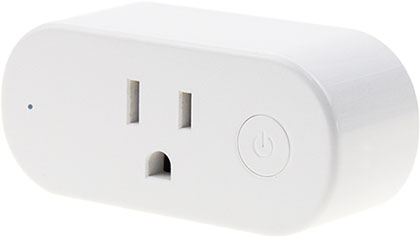
Device: Wave Plug US
- USA Part number/Ordering Code: QNPL-001X16US
- Z-Wave Product type ID: 0x0002
- Z-Wave Product ID: 0x0088
- Z-Wave Manufacturer: Shelly Europe Ltd.
- Z-Wave Manufacturer ID: 0x0460
Terminology
- Device – In this document, the term “Device” is used to refer to the Shelly Qubino device that is a subject of this guide.
- Gateway – A Z-Wave® gateway, also referred to as a Z-Wave® controller, Z-Wave® main controller, Z-Wave® primary controller, or Z-Wave® hub, etc., is a device that serves as a central hub for a Z-Wave® smart home network. The term “gateway” is used in this document.
- S button – The Z-Wave® Service button, located on Z-Wave® devices and used for various functions such as adding (inclusion), removing (exclusion), and resetting the device to its factory default settings. The term "S button" is used in this document.
Short description
The Wave Plug US (Device) is a smart plug/outlet with power measurement and overheating protection, which allows remote control of electric appliances through a mobile phone, tablet, PC, or home automation system.
Main applications
- Residential
- MDU (Multi Dwelling Units – apartments, condominiums, hotels, etc.)
- Light commercial (small office buildings, small retail/restaurant/gas station, etc.)
- Government/municipal
- University/college
Integrations
Qubino devices are developed on the world's leading technology for smart homes – Z-Wave.
This means Qubino works with all certified gateways supporting Z-Wave communication protocol.
To make sure the functions of Qubino products are supported on your gateway, we are regularly executing compatibility tests of our devices with different Z-Wave gateways.
Simplified internal schematics
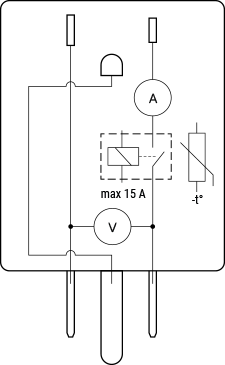
Device electrical interfaces
Inputs
- 1 NEMA 5-15 (Type-B) plug
Outputs
- 1 NEMA 5-15 (Type-B) socket
Connectivity
Z-Wave – Unsecure, S0 Security, S2 Unauthenticated Security, S2 Authenticated Security
Safety features
Overheat protection
- Switches off its own relay
- Sends the Notification Report to the Gateway (Overheat detected)
- LED lights react as specified above (check blinking mode for Overheat detected)
Any of the following activities reset this alarm: power cycle, remotely device reboot (by Parameter No. 117), short press on S button.
NOTE: The Overheat protection is always active and cannot be disabled.
Additional description above under chapter Notification for Overheat detected.
Over-current Protection
If the current exceeds 16A +10% (Max switching current +10%) for more than 5 seconds, the Device will:
- Switch off its own relay
- Send the Notification Report to the Gateway (Over-current detected)
- LED lights react as specified above (check blinking mode for Over-current detected)
Any of the following activities reset this alarm: power cycle, remotely device reboot (by Parameter No. 117).
NOTE: The Over-current protection is always active and cannot be disabled.
Additional description above under chapter Notification for Over-current detected.
Over-voltage Protection
Valid for standard power supply voltage 230 V AC. If the voltage exceeds 240 V AC +15% (278 V AC) for more than 5 seconds, the Device will:
- Switch off its own relay
- Send the Notification Report to the Gateway (Over-voltage detected)
- LED lights react as specified above (check blinking mode for Over-voltage detected)
Any of the following activities reset this alarm: power cycle, remotely device reboot (by Parameter No. 117), short press on S button.
NOTE: The Over-current protection is always active and cannot be disabled.
Additional description above under chapter Notification for Over-voltage detected.
Supported load types
- Resistive (incandescent bulbs, heating devices)
- Capacitive (capacitor banks, electronic equipment, motor start capacitors)
- Inductive with RC Snubber (LED light drivers, transformers, fans, refrigerators, air-conditioners)
User interface
S button and operating modes
- Normal mode
- Setting in progress mode
- Setting mode (with S button)
- Settings mode is required to start desired procedures such as adding (inclusion), removing (exclusion), factory reset, etc. It has a limited time of operation. After the procedure concludes, the Device automatically returns to Normal mode.
- Entering Setting mode:
- Press and hold the S button until the LED turns solid blue.
- An additional press on the S button changes the menu in an infinite loop.
- Menu LED status has a timeout of 10 seconds before returning to Normal state.
S button’s functions
- Manually add the Device to a Z-Wave network
- Manually remove the Device from a Z-Wave network
- Factory reset the Device
LED Signalisation
Click to see LED signalisation
Normal mode
Removed/Excluded: LED blinks blue in Mode 1 for 10 seconds after every power cycle.

Added/Included: LED blinks violet in Mode 1 for 10 seconds after every power cycle.

Relay ON & Power consumption >85% of Max: LED stays red solid on starting 11 seconds after every power cycle.
Relay ON & Power consumption between 0W and 85% of Max: LED stays blue solid on starting 11 seconds after every power cycle.
Settings in progress
Factory reset and reboot: During factory reset, LED turns solid violet.
Adding / Removing: During adding or removing, LED blinks blue in Mode 2.

Firmware updating OTA: During OTA update, LED blinks blue and red in Mode 2.

Settings mode with S button
Adding / Removing menu selected: LED stays blue for up to 10 seconds.
Adding / Removing process selected: While pressing S button, LED blinks blue in Mode 3.

Factory reset menu selected: LED stays red for up to 10 seconds.
Factory reset process selected: While pressing S button, LED blinks red in Mode 3.

Alarm Mode
Over-current detected: LED blinks red in Mode 4.
Overheat detected: LED blinks red in Mode 4.

Over-voltage detected: LED blinks red in Mode 4.

Specifications
| Feature | Value |
|---|---|
| Power supply | 120 V ±10%, 60 Hz |
| Power consumption | < 0.3 W |
| Power measurement [W] | Yes |
| Max switching voltage AC | 140 V |
| Max switching current AC | 15 A |
| Overheating protection | Yes |
| Overcurrent protection | Yes |
| Overvoltage protection | Yes |
| Distance | Up to 40 m indoors (131 ft.) |
| Z-Wave repeater | Yes |
| CPU | Z-Wave S800 |
| Z-Wave frequency band | 908.4 MHz |
| Max radio frequency power transmitted | < 25 mW |
| Size (H x W x D) | 38 x 84 x 52 ±0.5 mm / 1.5 x 3.3 x 2.0 in ±0.02 in |
| Weight | 70 ±1 g / 2.47 ±0.04 oz |
| Mounting | Wall socket |
| Shell material | Plastic |
| Color | White |
| Ambient temperature | -20°C to 40°C / -5°F to 105°F |
| Humidity | 30% to 70% RH |
| Max altitude | 2000 m / 6562 ft. |
Plug description
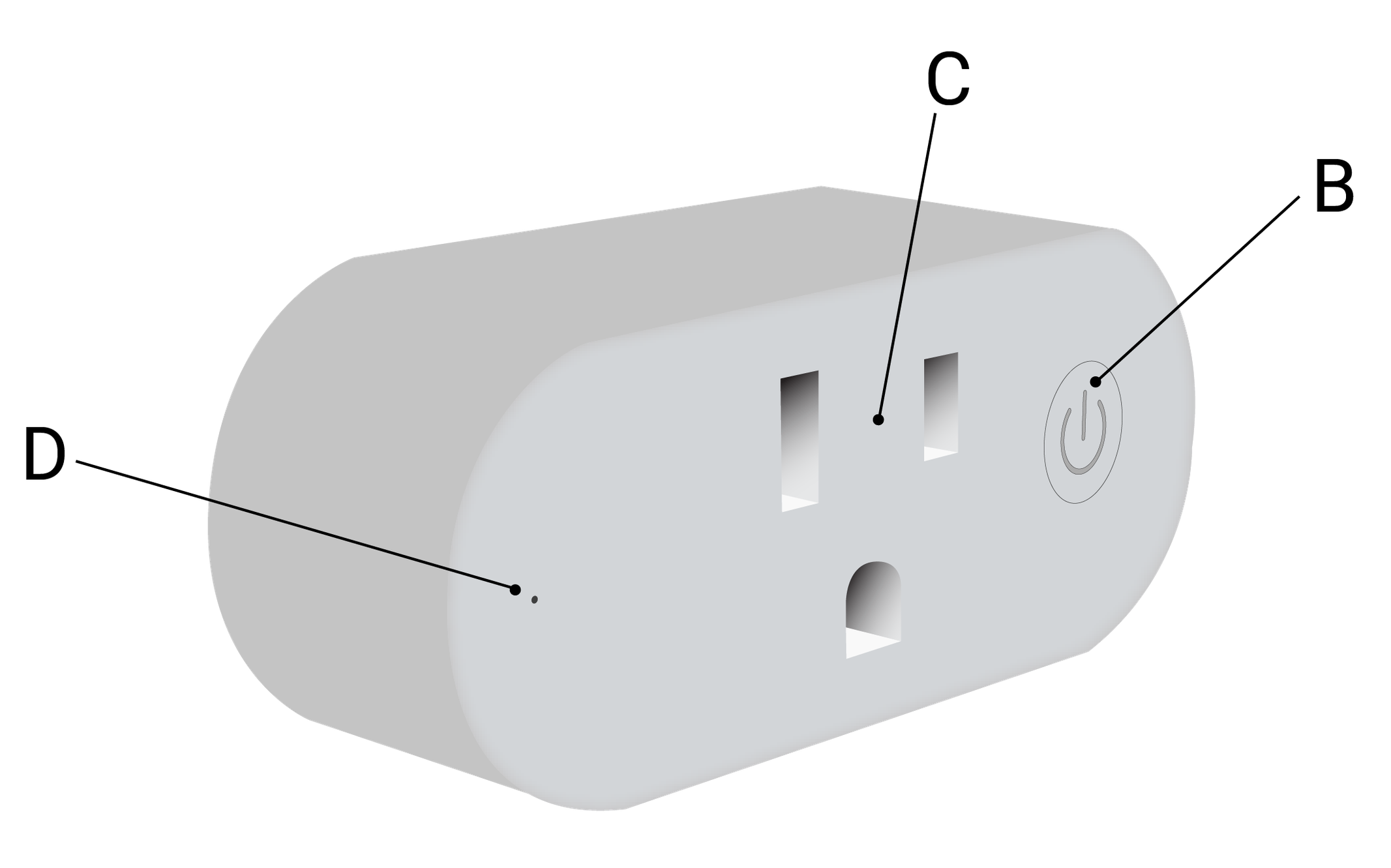
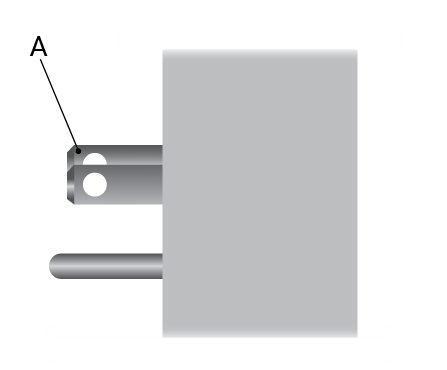
Legend
| Letter | Description |
|---|---|
| A | Plug – NEMA 5-15 (Type-B) |
| B | S Button |
| C | Socket – NEMA 5-15 (Type-B) |
| D | LED indication |
About Z-Wave
Adding the Device to a Z-Wave® network (inclusion)
Note! All Device outputs (O, O1, O2, etc.) will turn the load 1s on/off/1s on/off if the Device is successfully added to/removed from a Z-Wave® network.
Note! In case of Security 2 (S2) inclusion, a dialog will appear asking you to enter the corresponding PIN Code (5 underlined digits) written on the Z-Wave® DSK label on the side of the Device and in the packaging.
IMPORTANT: The PIN Code must not be lost.
SmartStart adding (inclusion)
SmartStart-enabled products can be added by scanning the Z-Wave® QR code on the Device with a gateway supporting SmartStart. No further action is required; the Device adds automatically within 10 minutes of being powered on near the network.
- Scan the QR code on the Device label using the gateway app and add the Security 2 (S2) Device Specific Key (DSK) to the provisioning list.
- Connect the Device to power.
- Check if the blue LED is blinking in Mode 1. If yes, the Device is not added.
- Adding starts automatically within seconds after power-up.
- Blue LED blinks in Mode 2 during addition.
- Violet LED blinks in Mode 1 if successful.
Adding (inclusion) with the S button
- Connect the Device to power.
- Confirm blue LED is blinking in Mode 1 (not added).
- Enable add/remove mode on the gateway.
- Press and hold the S button until the LED turns solid blue (enter Setting mode).
- Release, then press and hold (>2s) until the blue LED starts blinking in Mode 3. Releasing triggers Learn mode.
- Blue LED blinks in Mode 2 during addition.
- Violet LED blinks in Mode 1 if successful.
Note: In Setting mode, the Device times out after 10 seconds and returns to Normal mode.
Removing the Device from a Z-Wave® network (exclusion)
Note: The Device will be removed from your Z-Wave® network, but custom configurations are preserved.
Note! All Device outputs will blink 1s on/off/1s on/off upon successful removal.
Removing (exclusion) with the S button
- Connect the Device to power.
- Confirm violet LED is blinking in Mode 1 (added).
- Enable add/remove mode on the gateway.
- Press and hold S button until LED turns solid blue.
- Release, then press and hold (>2s) until blue LED blinks in Mode 3. Releasing starts LEARN MODE.
- Blue LED blinks in Mode 2 during removal.
- Blue LED blinks in Mode 1 if successful.
Note: In Setting mode, the Device times out after 10 seconds and returns to Normal mode.
Factory reset
General
After factory reset, all custom parameters and stored values (kWh, associations, routing, etc.) revert to defaults. HOME ID and NODE ID are deleted. Use only when the gateway is missing or inoperable.
With the S button
- Press and hold S button until LED turns solid blue (enter Setting mode).
- Press S button multiple times until LED turns solid red.
- Press and hold (>2s) S button until red LED starts blinking in Mode 3. Releasing triggers factory reset.
- During reset, LED turns solid violet for ~1 second, then blue and red blink in Mode 3 for ~2 seconds.
- Blue LED blinks in Mode 1 if successful.
Remotely via Parameter No. 120
Set Parameter No. 120 to 1431655765 (hex 0x55555555) to trigger remote factory reset.
Z-Wave Security and Device Specific Key (DSK)
The Device supports Security 2 (S2) using Strong AES-128 Encryption, making Z-Wave® one of the most secure IoT platforms.
- Authenticated Control
- Out-of-band DSK for inclusion
- Compatible with most implementations
The Device supports S2 Authenticated, Unauthenticated, and Unsecure inclusion.
Note: When adding via S2-enabled gateway, the DSK PIN (first five digits) is required. The DSK is printed on the label on the side of the Device and included in packaging. Do not remove the label.
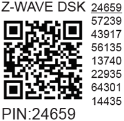
The first five digits are highlighted/underlined. The DSK is also represented via QR code.
Joining node obfuscates its public key by setting bytes 1–2 to zero (0x00) before RF transfer.
DSK may be used for out-of-band (OOB) authentication.
Z-Wave Parameters
Parameter No. 17 – Restore O (O1) state after power failure
- Size: 1 Byte
- Default: 0
- Values:
0: Saves last state and restores after power loss1: Does not save state; remains OFF after power loss
Parameter No. 19 – O (O1) Auto OFF with timer
- Size: 2 Bytes
- Default: 0
- Values:
0: Auto OFF disabled1–32535: Timer in seconds (or milliseconds – see Param 25)
Parameter No. 20 – O (O1) Auto ON with timer
- Size: 2 Bytes
- Default: 0
- Values:
0: Auto ON disabled1–32535: Timer in seconds (or milliseconds – see Param 25)
Parameter No. 23 – O (O1) contact type – NO/NC
- Size: 1 Byte
- Default: 0
- Values:
0: Normally Open (NO)1: Normally Closed (NC)
| Par-NO/NC | Command | Device Output State |
|---|---|---|
| NO (0) | OFF | OFF (0 V) |
| NO (0) | ON | ON (230 V) |
| NC (1) | OFF | ON (230 V) |
| NC (1) | ON | OFF (0 V) |
Parameter No. 25 – Set timer units to s or ms for O (O1)
- Size: 1 Byte
- Default: 0
- Values:
0: Seconds1: Milliseconds
Parameter No. 36 – O (O1) Power report on change – percentage
- Size: 1 Byte
- Default: 50
- Values:
0: Reports disabled1–100: % change threshold
Note: Power reports include voltage (V) and current (A).
Note: Reports sent no more frequently than defined by Param 39.
Note: Wave Shutter reports sum of O1 and O2 power/current (only one active at a time).
Parameter No. 39 – Minimum time between reports (O) O1
- Size: 1 Byte
- Default: 30
- Values:
0: Reports disabled1–120: Interval in seconds
Note: Related to Param 36.
Note: Values below 30s may cause network congestion.
Note: Wave Shutter reports combined power/current from O1 and O2.
Parameter No. 91 – Water Alarm
- Size: 4 Bytes
- Default: 0
- Values:
0: No action1: Open relay / Open blinds (Up position)2: Close relay / Close blinds (Down position)
Parameter No. 92 – Smoke Alarm
Same as above.
Parameter No. 93 – CO Alarm
Same as above.
Parameter No. 94 – Heat Alarm
Same as above.
Parameter No. 105 – LED Signalisation intensity
- Size: 1 Byte
- Default: 100
- Values: 0–100 (%)
Implemented in Wave 1, Wave 1PM, Wave 2PM (2024). Dimmable LEDs.
Parameter No. 117 – Remote Device reboot
- Size: 1 Byte
- Default: 0
- Values:
0: Function inactive1: Remote reboot (use for troubleshooting only)
After reboot, value resets to default.
Parameter No. 120 – Factory Reset
- Size: 4 Bytes
- Default: 0
- Values:
0: Don’t reset1431655765(0x55555555): Perform factory reset
Parameters 201–203 – Serial Number
- Size: 4 Bytes each
- Default: 2147483647
- Cannot be changed by user
Z-Wave Command Class
- ASSOCIATION_V2 [S0, S2]*
- ASSOCIATION_GRP_INFO_V3 [S0, S2]*
- BASIC_V2 [S0, S2]*
- SWITCH_BINARY_V2 [S0, S2]*
- CONFIGURATION_V4 [S0, S2]*
- DEVICE_RESET_LOCALLY_V1 [S0, S2]*
- FIRMWARE_UPDATE_MD_V5 [S0, S2]*
- INDICATOR_V3 [S0, S2]*
- MANUFACTURER_SPECIFIC_V2 [S0, S2]*
- METER_V6 [S0, S2]*
- MULTI_CHANNEL_ASSOCIATION_V3 [S0, S2]*
- NOTIFICATION_V8 [S0, S2]*
- POWERLEVEL_V1 [S0, S2]*
- SECURITY_V1
- SECURITY_2_V1
- SUPERVISION_V1
- TRANSPORT_SERVICE_V2
- VERSION_V3 [S0, S2]*
- ZWAVEPLUS_INFO_V2
Z-Wave Notifications Command Class
Overheat detected
| Comment | Overheat detected |
|---|---|
| Z-Wave Notification Type Name | Heat Alarm |
| Type - Value | 0x04 |
| Event | State |
| Notification Name | Overheat detected |
| Name - Value | 0x02 |
| Version | V2 |
| Device specific | Yes |
| LED signalisation | Check table |
| Device reaction | Switch OFF all outputs, send notification |
| Action to restore | Power cycle, remote reboot (Param 117), short press S button |
Over-current detected
| Comment | Over-current detected O |
|---|---|
| Notification Type Name | Power management |
| Type - Value | 0x08 |
| Event | State |
| Notification Name | Over-current detected |
| Name - Value | 0x06 |
| Version | V3 |
| Device specific | Yes |
| LED signalisation | Check table |
| Device reaction | Switch OFF output O, send notification |
| Action to restore | Power cycle, remote reboot (Param 117) |
Over-voltage detected
| Comment | Over-voltage detected |
|---|---|
| Notification Type Name | Power management |
| Type - Value | 0x08 |
| Event | State |
| Notification Name | Over-voltage detected |
| Name - Value | 0x07 |
| Version | V3 |
| Device specific | Yes |
| LED signalisation | Check table |
| Device reaction | Switch OFF all outputs, send notification |
| Action to restore | Power cycle, remote reboot (Param 117), short press S button |
Z-Wave Associations
Associations enable direct communication between devices without gateway involvement.
- Max 9 associated devices per group (fixed).
- Recommended: ≤5 per group to avoid delays.
- “Lifeline Group” reserved for gateway only (1 node).
Association Group 1 – Lifeline
Reports device status. Only gateway allowed.
- INDICATOR_REPORT: LED status
- DEVICE_RESET_LOCALLY_NOTIFICATION: triggered upon request
- SWITCH_BINARY_REPORT: status change for O (O1)
- NOTIFICATION_REPORT: triggered on Overheat detected
- NOTIFICATION_REPORT: triggered on Over-current detected
- NOTIFICATION_REPORT: triggered on Over-voltage detected
- METER_REPORT: triggered by load power consumption (based on Params 36–43)
Association Group 2
- Allowed nodes: 9
- Assigned to output O (O1)
- Triggered by O (O1)
- Supports: BASIC_SET (set On/Off state)
Z-Wave Important disclaimer
Z-Wave® wireless communication may not always be 100% reliable. This Device should not be used in life-critical or high-value scenarios. If unrecognized by gateway, manually change device type and ensure gateway supports Z-Wave Plus™ multi-level devices.
Troubleshooting
For help, visit: Support Portal
Compatibility with gateways
| Gateway | On/Off | W | kWh | V | A | Notes |
|---|---|---|---|---|---|---|
| Home Assistant | ✅ | ✅ | ✅ | ✅ | ✅ | |
| Homey | ✅ | ✅ | ✅ | ⚪ | ⚪ | *1 |
| Smart Things | ✅ | ✅ | ✅ | ⚪ | ⚪ | *1 With Shelly Wave edge driver |
| Vera Ezlo | ✅ | ✅ | ✅ | ✅ | ✅ |
Notes: *1 Gateway lacks placeholders for V and A values.
Function Meaning
| Function | Meaning / Tested |
|---|---|
| On/Off | Responds to app UI On/Off command |
| SW On/Off | Reports On/Off changes via switch input |
| Dimming | Responds to app UI dimming command |
| SW Dimming | Reports dimming state via switch |
| Watts | Reports watts unsolicited |
| kWh | Reports kWh unsolicited |
| Up/Down | Responds to app UI Up/Down |
| SW Up/Down | Reports Up/Down via switch |
| Slats | Responds to app UI slats command |
| SW Slats | Reports slats changes via switch |
| D control | Reports scene commands (single/double press, etc.) in detached mode |
| D Binary | Reports binary On/Off via switch in detached mode |
| Sensor # | Sensor reported in gateway; type noted |
Legend
| Symbol | State |
|---|---|
| ✅ | Working / Possible |
| ⚪ | Not Working / Not Possible |
| P | Partially |
| N/T | Not Tested |
| TBD | To be done |
Gateway guides
Useful guides available in the Shelly Knowledge Base