
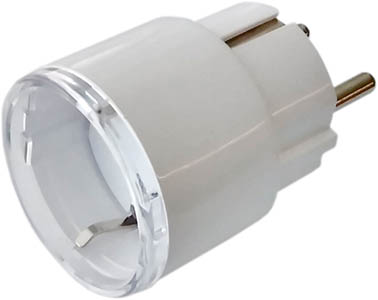
Device identification
- Device name: Shelly Plus Plug S
- Device model: SNPL-00112EU
- Device SSID: ShellyPlusPlugS-XXXXXX
Short description
Shelly Plus Plug S (The Device) is a smart plug/outlet with power measurement and overheating protection, which allows remote control of electric appliances through a mobile phone, tablet, PC, or home automation system. It can work standalone in a local Wi-Fi network or it can also be operated through cloud home automation services.
Shelly Plus Plug S can be accessed, set up and monitored remotely from any place where the User has internet connectivity, as long as the device is connected to a Wi-Fi router and the Internet.
The Device has an embedded Web Interface which can be used to monitor and control the device, as well as adjust its settings.
Main applications
- Residential
- MDU (Multi Dwelling Units - apartments, condominiums, hotels, etc.)
- Light commercial (small office buildings, small retail/restaurant/gas station, etc.)
- Government/municipal
- University/college
Integrations
- Samsung SmartThings
- Alexa
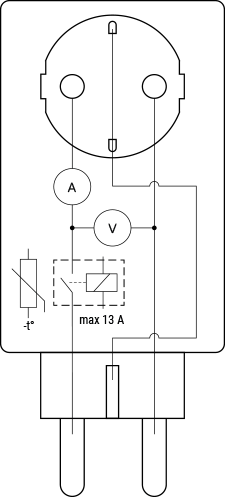
Device electrical interfaces
Input
- 1 CEE 7/7 plug
Output
- 1 CEE 7/3 (Type-F / Schuko) socket
Connectivity
- Wi-Fi
- Bluetooth
Safety features
- Overheating protection
- Overvoltage protection
- Overcurrent protection
- Overpower protection
Supported load types
- Resistive (incandescent bulbs, heating devices)
- Capacitive (capacitor banks, electronic equipment, motor start capacitors)
- Inductive (LED light drivers, transformers, fans, refrigerators, air-conditioners)
User interface
Inputs
- One push button
- Press to turn the output On/Off.
- Press and hold for 3 sec to check status (Possible only when the output is Off).
- Press and hold for 5 sec to reboot (Possible up to 60 sec after plugging in).
- Press and hold for 10 sec to factory reset (Possible up to 60 sec after plugging in).
Outputs
- LED indication
- When plugged in for the first time:
- Blue light flashing → indicates AP mode
- When powered again after successful Wi-Fi connection:
- Red light flashing slowly → reconnecting to Wi-Fi network
- Constant red light → cannot reconnect to Wi-Fi network
- When output is On:
- Power consumption represented by smooth color change (Default):
- Green at 0% of power limit
- Yellow at 50% of power limit
- Red at 100% of power limit
- User can select brightness (Default: 100%)
- Custom color (Default: Green, Default brightness: 100%)
- Off
- Power consumption represented by smooth color change (Default):
- When output is Off:
- Off (Default)
- Custom color (Default: Red, Default brightness: 100%)
- When OTA update is in progress:
- Red light flashing
- When plugged in for the first time:
Specifications
| Type | Value |
|---|---|
| Physical | |
| Size (HxWxD) | 44×44×70 ±0.5 mm / 1.73×1.73×2.75 ±0.02 in |
| Weight | 60 ±1 g / 2.08 ±0.04 oz |
| Compatible sockets | CEE 7/1, CEE 7/3 (Type F / Schuko), or CEE 7/5 (Type E) |
| Compatible plugs | CEE 7/2, CEE 7/4 (Type F / Schuko), CEE 7/7, CEE 7/16 (Type C), or CEE 7/17 |
| Shell material | Plastic |
| Color | White |
| Environmental | |
| Ambient temperature | -20 °C to 40 °C / -5 °F to 105 °F |
| Humidity | 30 % to 70 % RH |
| Max. altitude | 2000 m / 6562 ft |
| Electrical | |
| Power supply voltage AC | 230 V ±10 %, 50/60 Hz |
| Power supply voltage DC | N/A |
| Power consumption | < 1 W |
| Output circuits ratings | |
| Max switching voltage AC | 260 V |
| Max switching voltage DC | N/A |
| Max switching current AC | 12 A |
| Max switching current DC | N/A |
| Sensors, meters | |
| Internal-temperature sensor | Yes |
| Voltmeter | Yes |
| Ammeter | Yes |
| Power and energy meters | Yes |
| Radio | |
| RF band | 2400 - 2495 MHz |
| Max. RF power | <20 dBm |
| Wi-Fi protocol | 802.11 b/g/n |
| Wi-Fi Range | Up to 30 m / 100 ft indoors and 50 m / 160 ft outdoors (Depends on local conditions) |
| Bluetooth Protocol | 4.2 |
| Bluetooth Range | Up to 10 m / 33 ft indoors and 30 m / 100 ft outdoors (Depends on local conditions) |
| MCU | |
| CPU | ESP32 |
| Flash | 4 MB |
| Firmware capabilities | |
| Webhooks (URL actions) | 20 with 5 URLs per hook |
| Scripting | Yes |
| MQTT | Yes |
| CoAP | No |
Troubleshooting
...
Components and APIs
Printed user guide
Shelly Plus Plug S multilingual printed user and safety guide