
Shelly Wall Display X2i
Device Identification
- Device name: Shelly Wall Display X2i
- Device model: SAWD-5A1XX10EU0
- Device Bluetooth ID: 0x3005
Short Description
Shelly Wall Display X2i (the Device) is a smart home control panel with a 6.9” color display and interchangeable power base. It comes with a power base that provides switching functionality for one output load circuit.
Main Features
- Touch-sensitive 6.9” color display
- Power base with integrated relay for light control
- Easy navigation and customizable home screen
- Choice between panoramic and portrait view on the display
- Integrated 0.8 W speaker
- Integrated light sensor
- Power consumption monitoring of all devices in a room in your Shelly Smart Control account
Use Cases
- Space-efficient fitting: Install the Shelly Wall Display X2i in standard electrical wall boxes for light switches.
- Appliance Control: Use it to remotely control and automate the operation of various electric appliances such as lights, fans, or other devices. Adjust operation of dehumidifiers, humidifiers, and fans based on current temperature and humidity conditions. Control other devices based on integrated LUX measurement sensor.
- Power Monitoring: Monitor the power consumption of appliances in the room in your Shelly Smart Control account. This is useful for understanding energy usage patterns and promoting energy efficiency.
- Home Automation: Integrate the Shelly Wall Display X2i into your home automation system to create custom scenes and schedules for your devices.
- Audio integration: Connect a Bluetooth or Sonos speaker to the Shelly Wall Display X2i for enhanced audio control. Stream music, notifications, alarms, and other audio signals for better sound coverage.
- Energy Efficiency: Leverage the power measurement feature to identify energy-hungry appliances and make informed decisions to improve overall energy efficiency in your home.
- Remote Monitoring: Keep an eye on your devices even when you're away from home. The remote access feature allows you to monitor and control connected appliances from anywhere with internet connectivity.
- Climate control: Adjust the heating, ventilation, and air conditioning system based on current temperature and humidity levels to maintain a comfortable indoor environment.
- Prevent mold and mildew: Monitor humidity levels to prevent the growth of mold and mildew in spaces like basements and bathrooms. The Shelly Wall Display X2i can activate ventilation or dehumidification devices when needed.
Main Applications
- Residential
- MDU (Multi Dwelling Units – apartments, condominiums, hotels, etc.)
- Light commercial (small office buildings, small retail/restaurant/gas station, etc.)
- Government/municipal
- University/college
Integrations
- Amazon Alexa supported capabilities: Yes
- Google Smart Home supported traits: Yes
- Samsung SmartThings supported capabilities: Yes
Simplified Internal Schematics
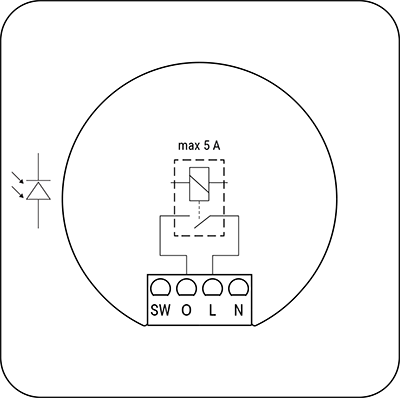
Device Electrical Interfaces
Inputs
- 2 power supply inputs on screw terminals: N and L
- 1 switch/button input on screw terminal
Outputs
- 1 output
Detailed Inputs and Outputs Description
N/A
Connectivity
- Wi-Fi
- Bluetooth
Protocols
- HTTP
- RPC over HTTP
- RPC over BLE
Supported Load Types
- Resistive – incandescent and halogen bulbs
- Capacitive – LED bulbs, LED drivers, CFL (compact fluorescent lamps)
- Inductive – LED light transformers
User Interface
Touch-sensitive 6.9” 5-point capacitive color display with fully-customizable layout.
Specifications
| Category | Quantity | Value |
|---|---|---|
| Physical | ||
| Size (HxWxD): | With power base: 87×178×36 mm / 3.43×7×1.42 inch Without power base: 87×178×11 mm / 3.43×7×0.43 inch | |
| Weight: | With power base: 292 g / 10.3 oz Without power base: 246 g / 8.68 oz | |
| Touch Screen: | 5-point capacitive | |
| Screen resolution, px: | 1440×720p | |
| Screw terminals max torque: | 0.4 Nm / 3.5 lbin | |
| Conductor cross section: | 0.75 to 2.5 mm² / 18 to 14 AWG (solid, stranded, and bootlace ferrules) | |
| Conductor stripped length: | 6 to 7 mm / 0.24 to 0.28 inch | |
| Mounting: | Wall box | |
| Shell material: | Plastic, aluminum, glass | |
| Shell color: | Display: Black, Silver 1-Output Power base: Blue (CMYK: C-95%; M-53%; Y-0%; K-0%) | |
| Speaker: | 0.8W × 1 | |
| Environmental | ||
| Ambient working temperature: | -20 °C to 40 °C / -5 °F to 105 °F | |
| Humidity: | 30 % to 70 % RH | |
| Max. altitude: | 2000 m / 6562 ft | |
| Electrical | ||
| Power supply: | 100–240 V~, 50/60 Hz | |
| Power consumption: | < 5 W | |
| USB TYPE-C power supply: | 5 V⎓, 1 A | |
| Output circuits ratings | ||
| Max. switching voltage: | 240 ~ | |
| Max. switching current: | 5 A | |
| USB TYPE-C, voltage: | 5 V⎓ | |
| USB TYPE-C, current: | 0.5 A | |
| Sensors, meters | ||
| Light sensor: | Yes | |
| Microphone: | Yes | |
| G-sensor: | Yes | |
| Proximity sensor: | Yes | |
| Radio | ||
| Wi-Fi | ||
| Protocol: | Wi-Fi 6 Dual Band | |
| RF band: | 2.4 GHz, 5 GHz | |
| Max. RF power: | < 20 dBm | |
| Range: | Up to 30 m / 100 ft indoors and 50 m / 160 ft outdoors (Depends on local conditions) | |
| Bluetooth | ||
| Protocol: | 5.0 | |
| RF band: | 2402 – 2480 MHz | |
| Max. RF power: | < 4 dBm | |
| Range: | Up to 10 m / 33 ft indoors and 30 m / 100 ft outdoors (Depends on local conditions) | |
| Microcontroller unit | ||
| CPU: | Rockchip RK3326-S Quad core Cortex-A35 1.5GHz | |
| RAM: | 2 GB | |
| Flash: | 8 GB | |
| System: | Android 11 | |
| Firmware capabilities | ||
| Schedules: | 20 | |
| Webhooks (URL actions): | 20 with 2 URLs per hook… | |
| Scripting: | No | |
| MQTT: | Yes |
Basic Wiring Diagrams
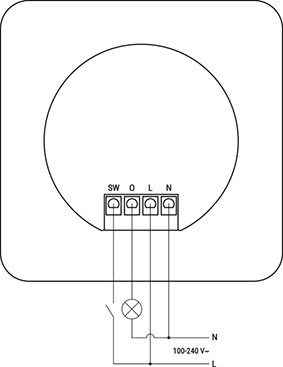
Legend
| Terminals | Description | Wires | Description |
|---|---|---|---|
| SW | Switch input terminal | N | Neutral wire |
| O | Output terminal | L | Live (100–240 V~, 50/60 Hz) wire |
| L | Live (100–240 V~, 50/60 Hz) terminal | ||
| N | Neutral terminal |
Troubleshooting
Ensure that the device is properly powered:
- Check power cables, outlets, and any power indicators on the device.
Inspect Connections:
- Verify that all connections, including cables and wiring, are secure and properly seated. Loose connections can lead to functionality issues.
Review Device Settings:
- If applicable, check and review the device settings. Ensure that configurations are correct and match your intended use.
Update Firmware/Software:
- Check if there are any available firmware or software updates for the device. Keeping the device up-to-date can resolve known issues and improve performance.
Restart or Reboot:
- Sometimes, a simple restart can resolve temporary glitches. Turn off the device, wait a few seconds, and then power it back on.
Check Network Connection:
- If the device is connected to a network, ensure that the network settings are correct. Test the network connection and consider restarting routers or switches if needed.
Inspect Physical Components:
- Physically inspect the device for any signs of damage, overheating, or unusual behavior.
Check Compatibility:
- Ensure that the device is compatible with other components in your system, including hardware and software. Incompatibility issues can lead to malfunctions.
Monitor Environmental Factors:
- Consider environmental factors such as temperature and humidity.
Inspect Power Supply Quality:
- Poor power quality, including voltage spikes or fluctuations, can affect device performance. Consider using a surge protector or voltage regulator if needed.
These are general troubleshooting steps, and the specific steps may vary based on the type of device or issue you are facing. If the issue persists and you are unable to resolve it, consider reaching out to our technical customer support.
Components and APIs
Compliance and Certification
- Shelly Wall Display X2i Multilingual EU Declaration of Conformity (2025-11-18)
- Shelly Wall Display X2i UK PSTI ACT Statement of Compliance (2025-11-18)
- UKCA Declaration Shelly Wall Display X2i (2025-11-18)