
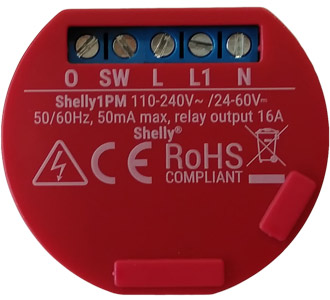
Device identification
- Device name: Shelly 1PM
- Device model: SHSW-PM
- Device SSID: shelly1pm-XXXXXX
Short description
Shelly 1PM is a small form factor smart switch with power measurement, which allows remote control of electric appliances through a mobile phone, tablet, PC, or home automation system. It can work standalone in a local Wi-Fi network or it can also be operated through cloud home automation services.
Shelly 1PM can be accessed, controlled and monitored remotely from any place where the user has internet connectivity, as long as the device is connected to a Wi-Fi router and the Internet.
It can be retrofitted into standard electrical wall boxes, behind power sockets and light switches or other places with limited space.
Shelly 1PM has an embedded Web Interface that can be used to monitor and control the device, as well as adjust its settings.
Main applications
- Residential
- MDU (Multi Dwelling Units – apartments, condominiums, hotels, etc.)
- Light commercial (small office buildings, small retail/restaurant/gas station, etc.)
- Government/municipal
- University/college
Integrations
- Samsung SmartThings
- Alexa
Simplified internal schematics
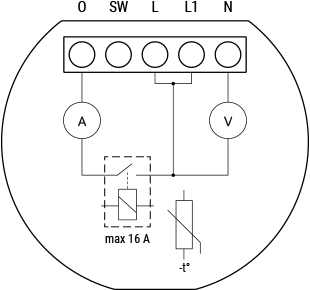
Device electrical interfaces
Inputs
- 1 switch/button input on screw terminal
- 3 power supply inputs on screw terminals: N (+), L, L1
Outputs
- 1 relay output with power measurement on screw terminal
Add-on interface
- Shelly proprietary serial interface
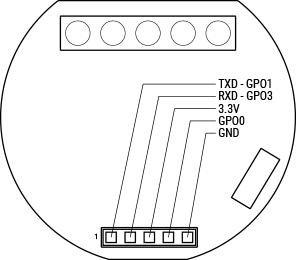
⚠ CAUTION! High voltage on the add-on interface when the device is powered!
Connectivity
- Wi-Fi
Safety features
- Overheating protection
- Overpower protection
Supported load types
- Resistive (incandescent bulbs, heating devices)
- Capacitive (capacitor banks, electronic equipment, motor start capacitors)
- Inductive with RC Snubber (LED light drivers, transformers, fans, refrigerators, air-conditioners)
User interface
User interface
Inputs
- One (Reset) button
- Press and hold for 5 seconds to enable device access point.
- Press and hold for 10 seconds to factory reset the device.
Outputs
- LED (Red) indication
- AP (Access Point) enabled and Wi-Fi disabled: 1 second ON / ¼ second OFF
- Wi-Fi enabled, but not connected to a Wi-Fi network: 2 seconds ON / ¼ seconds OFF
- Connected to a Wi-Fi network: Constantly ON
- Cloud enabled, but not connected: 1 second ON / 5 seconds OFF
- Connected to Shelly Cloud: Constantly ON
- OTA (Over the Air Update): ½ second ON / ½ second OFF
- Button pressed and held for 5 seconds: ¼ second ON / ¼ second OFF
- Button pressed and held for 10 seconds: ⅛ second ON / ⅛ second OFF
The list above starts with the initial device status and the lowest priority. Every next state cancels the previous one.
Specifications
| Type | Value |
|---|---|
| Physical | |
| Size (HxWxD) | 36x41x17 mm / 1.42x1.61x0.67 in |
| Weight | |
| Mounting | Wall console |
| Screw terminals max torque | 0.4 Nm / 3.5 lbin |
| Conductor cross section | 0.5 to 1.5 mm² / 20 to 16 AWG |
| Conductor stripped length | 5 to 6 mm / 0.20 to 0.24 in |
| Shell material | Plastic |
| Color | Red |
| Environmental | |
| Ambient temperature | -20 °C to 40 °C / -5 °F to 105 °F |
| Humidity | 30 % to 70 % RH |
| Max. altitude | 2000 m / 6562 ft |
| Electrical | |
| Power supply | 110 - 240 VAC / 24 - 60 VDC |
| Power consumption | < 1 W |
| Output circuits ratings | |
| Max switching voltage AC | 250 V |
| Max switching voltage DC | 60 V |
| Max switching current AC | 16 A |
| Max switching current DC | 10 A |
| Sensors, meters | |
| Internal temperature sensor | Yes |
| Wattmeter (AC) | Yes |
| Radio | |
| RF band | 2401 - 2495 MHz |
| Max. RF power | <20 dBm |
| Wi-Fi protocol | 802.11 b/g/n |
| Wi-Fi Range | Up to 30 m / 100 ft indoors and 50 m / 160 ft outdoors (Depends on local conditions) |
| MCU | |
| CPU | ESP8266 |
| Flash | 2 MB |
| Firmware capabilities | |
| Schedules | 18 |
| Webhooks (URL actions) | 6 with 5 URLs per hook |
| Scripting | No |
| MQTT | Yes |
| CoAP | Yes |
Basic wiring diagrams
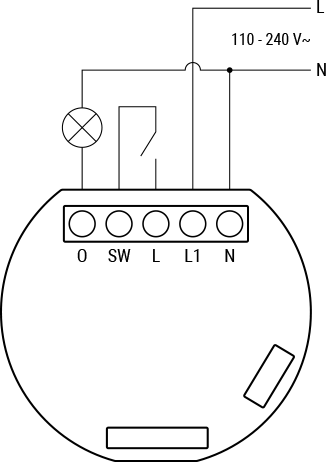
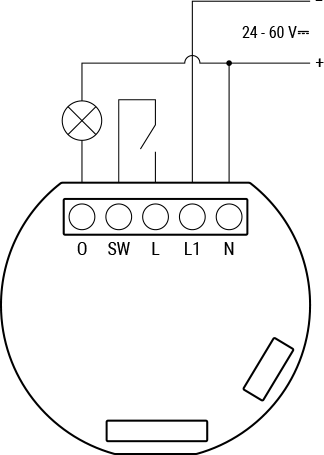
Legend
| Terminals | Description | Wires | Description |
|---|---|---|---|
| I | Load circuit input terminal | L | Live (110 - 240 VAC) wire |
| O | Load circuit output terminal | N | Neutral wire |
| SW | Switch (controlling O) input terminal | + | Positive wire |
| L, L1 | Live (110-240 V) terminal | - | Negative wire |
| N | Neutral terminal |
Troubleshooting
...
Web Interface guide
Read the Shelly 1PM web interface guide
Components and APIs
Printed User Guide
Printed user guide - English, Deutsch, Italiano, Español, Português, Français
Compliance
Shelly 1PM multilingual EU declaration of conformity
Installation guides
There are no items with the selected labels at this time.