
Shelly i4 Gen4
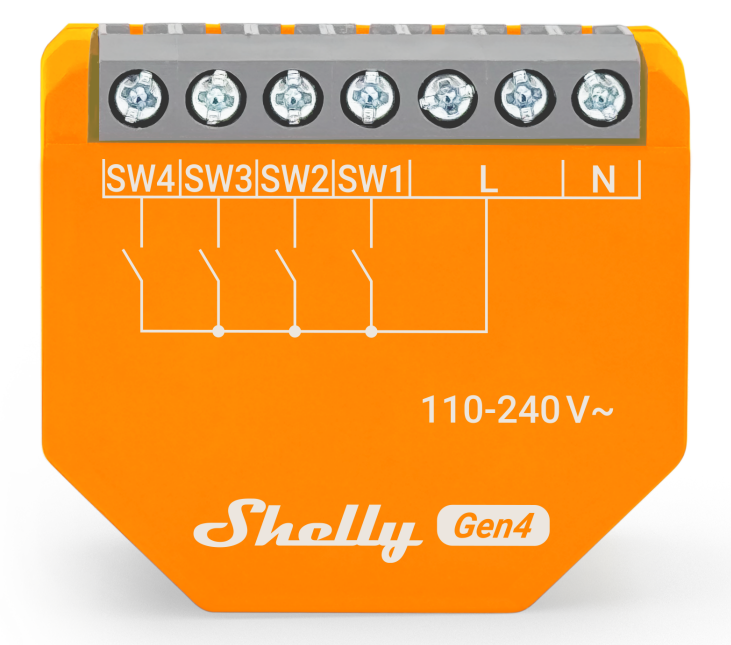
Device Identification
- Device name: Shelly i4 Gen4
- Device model: S4SN-0A24X
- Device SSID: ShellyI4G4-XXXXXXXXXXXX
- BLE Model ID: 0x1819
Short Description
Shelly i4 Gen4 is a smart Wi-Fi switch input controller that allows you to manually activate or deactivate any created scene, run synchronized actions, or execute complex trigger scenarios. You can use Shelly i4 Gen4 to control other connected Shelly switches, sensors, or HTTP and MQTT-controlled devices. Small enough to fit behind every wall switch, Shelly i4 Gen4 can show the status and control the action of four inputs.
You can access and monitor Shelly i4 Gen4 remotely from any place where you have internet connectivity, if the device is connected to a Wi-Fi router and the Internet.
You can retrofit the device into standard electrical wall boxes, behind power sockets, light switches, or into other places with limited space.
Shelly i4 Gen4 has an embedded Web Interface that you can use to control it and set it up.
The device has multi-protocol wireless MCU which provides Zigbee and Bluetooth connectivity, ensuring a secure connection.
This device is compatible with Matter.
Main Features
- Wi-Fi Connectivity: The device can connect to your home Wi-Fi network, allowing you to remotely monitor humidity and temperature data through a smartphone app or other compatible devices.
- Integration with Smart Home Platforms: You can integrate the Shelly i4 Gen4 with popular smart home platforms, including Google, Alexa, and Samsung SmartThings. This enables voice control and automation capabilities through these platforms.
- Local and Cloud Control: Can function independently in a local Wi-Fi network and can also be operated through cloud home automation services.
- Bluetooth Connectivity: Bluetooth and BLE gateways are available for inclusion purposes, which may be useful during the setup process.
- Zigbee Connectivity: Zigbee is available for inclusion purposes, which may be useful during the setup process.
- User-Friendly Interface: The device provides a user-friendly interface with a reset button for manual interactions.
- Improved Processor: Upgraded with an improved processor and Zigbee connectivity for enhanced performance.
- Embedded Web Interface: Features an embedded web interface for monitoring, control, and adjustment of settings.
- Wireless Connectivity: The device supports Wi-Fi (802.11 b/g/n/ax) and Bluetooth 5.0 protocols with specified indoor and outdoor range capabilities.
- BLE Gateway: Bridge between your Shelly BLU devices and the wider Shelly ecosystem. It receives Bluetooth signals and sends them to the cloud or locally to another non-Bluetooth device.
- Wi-Fi Range Extender for IoT Devices: A Wi-Fi extender is employed to expand the reach of your Wi-Fi network by receiving your current Wi-Fi signal, enhancing its strength, and then transmitting the enhanced signal over a wider area.
- Zigbee Range Extender for IoT Devices: A Zigbee extender is employed to expand the reach of your Zigbee network by receiving your Zigbee signal, enhancing its strength, and then transmitting the enhanced signal over a wider area.
- Scripting: Shelly Script Language Features
- Wide Range of Integrations: The device can be integrated with 3rd party home systems, documented HTTP API, MQTT(s), Web Hooks over HTTP and HTTPS, UDP
- Virtual Components: Virtual Components Documentation
- KNX net/IP Support: KNX Integration Guide
Use Cases
- Remote Appliance Control: Turn on or off electric appliances remotely using your mobile phone, tablet, PC, or home automation system.
- Internet-Connected Convenience: Access and control devices from anywhere with internet connectivity, as long as the Shelly i4 Gen4 is connected to a Wi-Fi router.
- Home Automation: Shelly i4 Gen4 enables automatic control of power appliances for a more relaxing and enjoyable experience.
Main Applications
- Residential
- MDU (Multi Dwelling Units – apartments, condominiums, hotels, etc.)
- Light commercial (small office buildings, small retail/restaurant/gas station, etc.)
- Government/municipal
- University/college
Integrations
Amazon Alexa Supported Capabilities
Yes - through a virtual device routine
Google Smart Home Supported Traits
No
Samsung SmartThings Supported Capabilities
No
Device Electrical Interfaces
Inputs
- 4 switch/button inputs on screw terminal: SW1, SW2, SW3, and SW4
- 3 power supply inputs on screw terminals: 1 N and 2 L
Outputs
N/A
Add-on Interface
- Shelly proprietary serial interface
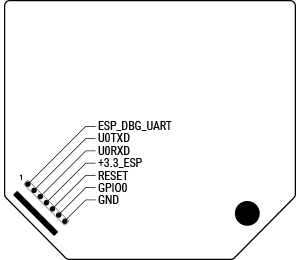
⚠ CAUTION! High voltage on the add-on interface when the device is powered!
Connectivity
- Ethernet
- Wi-Fi
- Bluetooth
Safety Function
- Overheating protection
User Interface
Inputs
- One (Control) button
- Press and hold for 5 seconds to enable Device access point and Bluetooth connection.
- Press and hold for 10 seconds to factory reset the device.
- Press the button 5 times to switch the device from Matter (default) to Zigbee profile. The device enters inclusion mode for 3 minutes. Include the device following the instructions of your Zigbee home automation system.
- Press the button 3 times to restart the inclusion mode for another 3 minutes if you missed the previous 3-minute window.
Outputs
- LED (monocolor) indication
- AP (Access Point) enabled and Wi-Fi disabled: 1 second ON / 1 second OFF
- Wi-Fi enabled, but not connected to a Wi-Fi network: 1 second ON / 3 seconds OFF
- Connected to a Wi-Fi network: Constantly ON
- Cloud is enabled, but not connected: 1 second ON / 5 seconds OFF
- Connected to Shelly Cloud: Constantly ON
- OTA (Over the Air Update): ½ sec ON / ½ sec OFF
- Button pressed and held for 5 seconds: ½ sec ON / ½ sec OFF
- Button pressed and held for 10 seconds: ¼ sec ON / ¼ sec OFF
Note: The list above starts with the initial device status and the lowest priority. Every next state cancels the previous one.
Specifications
| Quantity | Value |
|---|---|
| Physical | |
| Size (H×W×D) | 37×42×15 mm / 1.46×1.65×0.59 inch |
| Weight | 19 g / 0.67 oz |
| Screw terminals max torque | 0.4 Nm / 3.5 lbin |
| Conductor cross section | 0.5 to 4 mm² / 20 to 11 AWG (solid, stranded, and bootlace ferrules) |
| Conductor stripped length | 6 to 7 mm / 0.24 to 0.28 in |
| Mounting | Wall box |
| Shell material | Plastic |
| Shell color | Orange |
| Terminals color | Grey (Mouse Grey) |
| Environmental | |
| Ambient working temperature | -20 °C to 40 °C / -5 °F to 105 °F |
| Humidity | 30 % to 70 % RH |
| Max. altitude | 2000 m / 6562 ft |
| Electrical | |
| Power supply | 110 - 240 V~, 50/60 Hz |
| Power consumption | < 1 W |
| Neutral not needed | No |
| Sensors, meters | |
| Internal temperature sensor | Yes |
| Radio | |
| Wi-Fi | |
| Protocol | 802.11 b/g/n/ax |
| RF band | 2412 - 2472 MHz |
| Max. RF power | < 20 dBm |
| Range | Up to 30 m / 100 ft indoors and 50 m / 160 ft outdoors (depends on local conditions) |
| Bluetooth | |
| Protocol | 5.0 |
| RF band | 2402 - 2480 MHz |
| Max. RF power | < 4 dBm |
| Range | Up to 10 m / 33 ft indoors and 30 m / 100 ft outdoors (depends on local conditions) |
| Zigbee | |
| Protocol | 802.15.4 |
| Zigbee repeater | Yes |
| RF bands | 2400 to 2483.5 MHz |
| Max. RF power | < 20 dBm |
| Range | Up to 100 m / 328 ft indoors and 300 m / 984 ft outdoors (depends on local conditions) |
| Microcontroller unit | |
| CPU | ESP-Shelly-C68F |
| Flash | 8MB |
| Firmware capabilities | |
| Webhooks (URL actions) | 20 with 5 URLs per hook |
| Scripting | Yes |
| MQTT | Yes |
Basic Wiring Diagrams
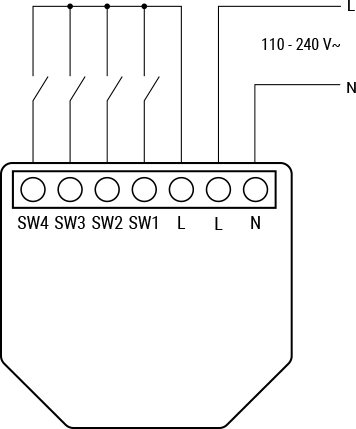
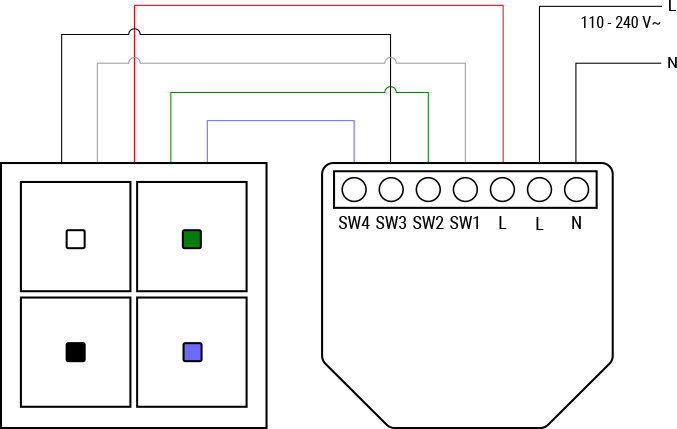
Legend
| Terminals | Description | Wires | Description |
|---|---|---|---|
| SW1, SW2, SW3, SW4 | Switch/button input terminals | L | Live wire (110–240 V~) |
| L | Live terminal (110–240 V~) | N | Neutral wire |
| N | Neutral terminal |
Shelly Smart Control
Components and APIs
Compliance
Shelly i4 Gen4 multilingual EU Declaration of Conformity
Printed User Guide
Shelly i4 Gen4 multilingual printed user and safety guide.pdf
Installation Guides
There are no items with the selected labels at this time.