
Shelly Plug S MTR Gen3
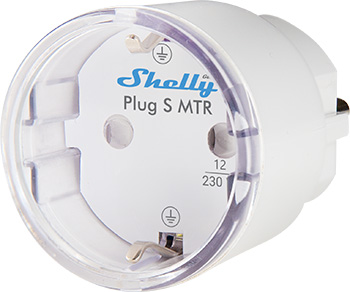
Device identification
- Device name: Shelly Plug S Gen3
- Device model: S3PL-00112EU
- Device SSID: ShellyPlugSG3-XXXXXXXXXXXX
- BLE ID: 0x1805
Short description
Shelly Plug S MTR Gen3 is one of the first Shelly devices to come with Matter support.
The Shelly Plug S MTR Gen3 (The Device) is a smart plug/outlet with power measurement and overheating protection, enabling remote control of electric appliances via mobile phone, tablet, PC, or home automation system. It can operate standalone in a local Wi-Fi network or be managed through cloud-based home automation services.
You can access, set up, and monitor the device remotely from anywhere with internet connectivity, as long as it's connected to a Wi-Fi router and the Internet.
The device includes an embedded Web Interface for monitoring, controlling, and adjusting settings.
Main features
- Matter support
- Next-generation Wi-Fi smart plug with multicolor LED indication
- Scripting (only supported when Matter is not enabled)
- Wi-Fi range extender
- BLE gateway
- Power metering
- Schedules
- Wide compatibility with third-party home automation systems
- Local actions
- Shelly Cloud / Shelly Smart Control app support (optional)
- Virtual Components
Use cases
- Use seamlessly and integrate together with other Matter devices
- Use with Apple devices (via Matter)
- Use it as a color night light:
- Night mode with custom settings
- When switched on, the Night mode reduces the brightness of the LED indication during night hours for undisturbed sleep.
- No more forgotten appliances on:
- Monitor and control all plugged-in appliances easily with just a few taps on your phone.
- Thanks to its integrated countdown timer and locally stored schedules, the Shelly Plug S MTR Gen3 can automatically switch off any forgotten device after an hour to save energy.
- Example: Iron, small ovens, heating electrical radiators
- Avoid energy waste by automating your electrical appliances:
- Automate office appliances not used at night or weekends using Shelly Plug S MTR Gen3.
- Set smart schedules to turn off power between 7:00 PM and 7:00 AM on weekdays, and from 7:00 PM Friday to 7:00 AM Monday — cutting energy consumption in half and optimizing monthly costs.
- Example: Smaller ovens, heating electrical radiators, IR heaters
- Air purifier that follows air conditions:
- If you live in a polluted urban area, especially during fall and winter, use scripting to extract real-time air pollution data and automatically turn your air purifier on when pollution levels rise.
- Example: Automate an air purifier based on third-party environmental data.
- Mildly dimmed night light for children's comfort:
- Customize the color and brightness of the LED indicator to create a soft ambient light ideal for kids’ rooms at night.
Integrations
Amazon Alexa supported capabilities
Yes
Google Smart Home supported traits
Yes
Samsung SmartThings supported capabilities
Yes
Simplified internal schematics
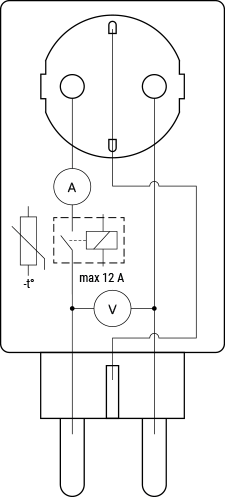
Device electrical interfaces
Input
- 1 CEE 7/7 plug
Output
- 1 CEE 7/3 (Type-F / Schuko) socket
Connectivity
- Wi-Fi
- Bluetooth
Safety functions
- Overheating protection
- Overvoltage protection
- Overcurrent protection
- Overpower protection
Supported load types
- Resistive (incandescent bulbs, heating devices)
- Capacitive (capacitor banks, electronic equipment, motor start capacitors)
- Inductive (LED light drivers, transformers, fans, refrigerators, air-conditioners)
User interface
Inputs
- One push button:
- Press to turn the output On/Off.
- Press and hold for 3 seconds to check status (only possible when output is Off).
- Press and hold for 5 seconds to reboot (possible within 60 seconds of plugging in).
- Press and hold for 10 seconds to factory reset (possible within 60 seconds of plugging in).
Outputs
- LED indication:
- First time plugged in: Blue light flashing → AP mode.
- After successful Wi-Fi connection:
- Slow red flash → reconnecting to Wi-Fi network.
- Constant red → unable to reconnect.
- When output is On:
- Power consumption represented by smooth color change (default):
- Green at 0% of power limit
- Yellow at 50% of power limit
- Red at 100% of power limit
- User can adjust brightness (default: 100%).
- Custom color (default: Green, default brightness: 100%).
- Off.
- Power consumption represented by smooth color change (default):
- When output is Off:
- Off (default).
- Custom color (default: Red, default brightness: 100%).
- During OTA update: Red light flashing.
Specifications
| Quantity | Value |
|---|---|
| Physical | |
| Size (H×W×D) | 44×44×70 ±0.5 mm / 1.73×1.73×2.75 ±0.02 in |
| Weight | 60 ±1 g / 2.08 ±0.04 oz |
| Compatible sockets | CEE 7/1, CEE 7/3 (Type F / Schuko), or CEE 7/5 (Type E) |
| Compatible plugs | CEE 7/2, CEE 7/4 (Type F / Schuko), CEE 7/7, CEE 7/16 (Type C), or CEE 7/17 |
| Shell material | Plastic |
| Color | White, Black |
| Environmental | |
| Ambient temperature | -20 °C to 40 °C / -5 °F to 105 °F |
| Humidity | 30 % to 70 % RH |
| Max. altitude | 2000 m / 6562 ft |
| Glow-wire temperature | 750 °C |
| Pollution degree | 2 |
| Required forced cooling | No |
| Electrical | |
| Power supply | 220–230 V~ 50/60 Hz |
| Power consumption | < 1 W |
| Rated impulse-withstand voltage | 2500 V |
| Output circuits ratings | |
| Max. switching voltage | 230 V~ |
| Max. switching current | 12 A |
| Max. output power | 2500 W (resistive load only) |
| Number of switching cycles | 10,000 |
| Overvoltage category | II |
| Duty-type | S1 |
| Switch type | One-way |
| Switch configuration | SPNO (single-pole, normally-open) |
| Type of circuit disconnection | Micro |
| Sensors, meters | |
| Internal temperature sensor | Yes |
| Voltmeter (AC) | Yes |
| Ammeter (AC) | Yes |
| Power and energy meters | Yes |
| Radio | |
| Wi-Fi | |
| Protocol | 802.11 b/g/n |
| RF band | 2401–2473 MHz |
| Max. RF power | <10 dBm |
| Wi-Fi Range | Up to 50 m / 164 ft outdoors, up to 30 m / 98 ft indoors (varies by environment) |
| Bluetooth | |
| Protocol | 4.2 |
| RF band | 2402 – 2480 MHz |
| Max. RF power | <4 dBm |
| Range | Up to 30 m / 98 ft outdoors, up to 10 m / 33 ft indoors (varies by environment) |
| Microcontroller unit | |
| CPU | ESP-Shelly-C38F |
| Flash | 8 MB |
| Firmware capabilities | |
| Webhooks (URL actions) | 20 hooks with 5 URLs per hook |
| Scripting | Yes |
| MQTT | Yes |
| CoAP | No |
Shelly Smart Control
Shelly Web user interface
Components and APIs
Compliance
- Shelly Plug S Gen3 multi-language EU Declaration of Conformity
- Shelly Plug S MTR Gen3 UK PSTI ACT Statement of Compliance
Compliance archive
Printed user guide
Installation guides
There are no items with the selected labels at this time.