
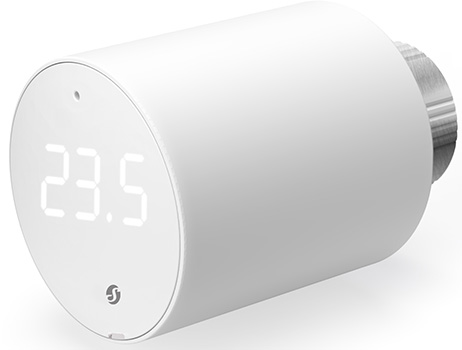
Device identification
- Device name: Shelly BLU TRV
- Device model: SBTR-001AEU
- Device Bluetooth ID: 0x0008
Short description
Shelly BLU TRV is a smart thermostatic radiator head with Bluetooth connectivity. It controls the temperature of a room by changing the flow of hot water through the radiator. The temperature can be adjusted at any time by turning the rotating knob left or right, or via your mobile phone, tablet, or PC. The device can also maintain room temperature according to a customizable weekly schedule. It is powered by two AA 1.5 V batteries.
Advanced Setup and Installation
Main features
- Bluetooth
- 2 × 1.5 V AA batteries (included)
- Precise temperature control
- Boost mode for fast warm-up
- Smart scheduling
- External sensor support (compatible with Shelly BLU H&T, BLU H&T ZB, BLU H&T Display ZB, Shelly BLU Door/Window sensors — connected via BLU Gateway Gen3)
- Integration with most smart home systems
- Requires BLU Gateway Gen3
Use cases
- Remote temperature control: Ensure your home is warm upon arrival and save energy by avoiding unnecessary heating when unoccupied.
- Smart scheduling for energy efficiency: Set up intelligent schedules in the cloud app to optimize heating and reduce energy costs.
- Boost mode for rapid heating: Activate Boost mode locally via the rotary encoder or remotely through the cloud. This fully opens the valve to quickly reach a comfortable temperature.
- Room-by-room temperature control: Independently manage temperatures in each room for personalized comfort and improved energy efficiency.
- Adaptive learning for personalized heating: Optimize heating using data from external sensors like Shelly BLU H&T and Shelly BLU Door/Window.
Connectivity
- Bluetooth Low Energy (BLE)
User interface
Inputs
User (reset) button
- Press once → Activate Bluetooth pairing mode
- Press 3 times → Activate Zigbee network association
- Press and hold for 30 seconds → Factory reset
- Press 5 times → Activate Find and Bind
Rotating knob
- Turn at least 1 step clockwise (CW) or counterclockwise (CCW) → Activate LEDs
- Turn quickly in short movements: less than 10 steps CCW → CW → CCW → CW (start in either direction) → Access TRV user menu (starts with battery level indication)
- Turn 4 steps CW → Activate Bluetooth pairing mode (active for 30 seconds)
- Turn 5 steps CW → Activate Zigbee network association (active for 30 seconds)
- Turn 1 step CW → Increase temperature by 0.1 °C
- Turn 1 step CCW → Decrease temperature by 0.1 °C
- Turn quickly for more than 10 steps CW → Turn on Boost mode
- Turn quickly for more than 10 steps CCW → Turn off Boost mode
Outputs
3-digit, 7-segment LED display
Mounting
 TRV head not mounted on the backplate
Calibration
 Calibration in progress
 Calibration passed
 Calibration failed
Temperature setting
 Temperature setting in progress
 Confirming the set temperature
Boost mode
 Boost mode on
 Boost mode off
Battery level
 0–25%
0–25% 25–50%
 50–75%
 75–100%
 Low battery level. Change batteries.
Pairing & Association
 Bluetooth pairing (active 30 seconds)
 Number of paired BLE devices
 No paired BLE devices
 Pairing/association successful
 Pairing/association failed
 Zigbee network association (active 30 seconds)
 Zigbee network status
 Zigbee network status – associated
 Zigbee identifying
User menu
- Battery level (default entry)
- Number of paired BLE devices (1 step CW)
- Zigbee network status (2 steps CW)
 Number of errors (3 steps CW)
- Bluetooth pairing (4 steps CW)
- Zigbee pairing/association (5 steps CW)
 Prompt to exit user menu (6 steps CW)
Updates
 Over-the-air update in progress
Errors
 No errors
- Number of errors
 Calibration error
 Insufficient voltage or current output. Change batteries.
Supported valves
Without adapter
- M30 × 1.5
With supplied adapter
- Danfos
- RA
- RAV
- RAVL
- Caleffi
- Giacomini
- M28 × 1.5
- Sam
- Slovarm
- Comap
- Markardys
- TA
- Herz
- MMA
- Remagg
- Pont a Mousson
With third-party adapter
- Gampper (27 mm thread and inner thread M22)
- Glacomini
- Ista
- Meges (M38 × 1.5)
- Ondal (M38 × 1.5)
- Oventrop (M30 × 1.0 with 4 prongs)
- Rossweiner (M33 × 2.0)
- Vallant (30.5 mm)
View the full list of compatible valves:
Shelly-TRV-Valves-compatibility-list-new.pdf
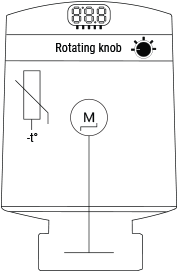
Simplified internal schematics
Specifications
| Quantity | Value |
|---|---|
| Physical | |
| Size (H×D) | 78 × Ø54 mm / 3.07 × Ø2.13 in |
| Weight | 107 g / 3.77 oz |
| Mounting | M30 / 15 |
| Mounting ring material | Nickel-plated brass |
| Shell material | Plastic |
| Shell color | White |
| Environmental | |
| Ambient working temperature | -20°C to +60°C / 68°F to 140°F |
| Humidity | 25% to 80% RH |
| Pollution degree | 2 |
| Electrical | |
| Power supply | 2× AA, 1.5 V (included) |
| Estimated battery life | Up to 2 years |
| Sensors, meters | |
| Temperature sensor | Yes |
| Radio | |
| Bluetooth | |
| Protocol | BLE 5 |
| RF band | 2402 – 2480 MHz |
| Max. RF power | < 8 dBm |
| Range | Up to 10 m indoors / 30 m outdoors (depends on conditions) |
| Zigbee | |
| Protocol | IEEE 802.15.4 |
| RF bands | 2405 to 2480 MHz |
| Max. RF power | < 8 dBm |
| Range | Up to 10 m indoors / 30 m outdoors (depends on conditions) |
| Firmware capabilities | |
| Schedules | Yes |
| Encryption | AES (CCM mode) |
FAQ
When should I use the Underfloor heating functionality?
- A1: When the device is not mounted on a radiator but controls underfloor heating.
- A2: When the room is too large for the radiator to distribute heat evenly.
- A3: When there is poor air circulation around the radiator.
When should I not use Underfloor heating functionality?
- A1: When external sensor readings are unreliable.
- A2: When maintaining precise temperature is critical.
Troubleshooting
| Problem | Possible cause | Solution |
|---|---|---|
| Shelly BLU TRV displays significantly incorrect temperature readings | The device expects data from an external sensor and doesn't revert to its default measurement | Run the external temperature command without parameters:http://<gateway_ip>/rpc/blutrv.call?id=<TRV_ID>&method=Trv.SetExternalTemperature¶ms={"id":0} |
| Shelly BLU TRV is unresponsive during firmware update | Update fails, causing device to enter Bootloader mode | Perform manual update using Shelly Debug BLE Devices app: 1. Open the app. 2. Press and hold the Reset button. 3. Insert new batteries and close the compartment — device appears in app for ~40 seconds. 4. Select device. 5. Start OTA update. ✅ Recommendations: Use Android smartphone; use fresh batteries; remove device from Bluetooth settings ("Forget"). |
| Device shows higher temperature than target but valve remains open | Underfloor Heating mode disabled; device uses corrected internal temp based on external sensor | This is normal behavior. Enable Underfloor Heating mode if you want the device to rely solely on external sensor data. |
| Valve opens early due to sudden temperature drop | Part of normal algorithm operation | This is expected behavior. |
| Radiator heats unevenly | Device reads lower temperature than expected | Bleed the radiator to ensure proper water flow. |
| Underfloor heating enabled but no updated sensor data | Gateway too far away | Move gateway closer to improve communication. |
Temperature increases after changing power_save flag | Firmware ≥1.2.0 resets temperature adjustments | Device will automatically adapt and gradually recalibrate. |
| Valve cannot fully close even at minimum temperature | Plunger is slightly shorter than required | Attach a small metal disk (approx. size of a 1 Euro cent coin) to the black plunger tip to extend travel. |
| Device cannot read from external sensor | Underfloor Heating feature not enabled | Enable Underfloor Heating: 1. Log into Shelly Smart Control app or Gateway Gen3 web interface. 2. Select TRV. 3. Go to Settings > TRV Behavior. 4. Enable Underfloor heating. |
Valve appears open despite displaying Boost Off | Boost Off message appears only after turning knob CCW >10 steps | To close valve, decrease target temperature by turning knob CCW <10 steps. |
| Calibration fails with "Low current" or "Battery low" | Insufficient battery voltage/current | Replace batteries. Calibration starts automatically upon mounting TRV head on backplate. |
*CW – clockwise
*CCW – counterclockwise
If unresolved, join our Shelly Support Group (English) or contact us at support@shelly.cloud.
Shelly Smart Control
Components and APIs
Compliance
- Shelly Blu TRV multilingual EU Declaration of Conformity (2025-07-22)
- Shelly BLU TRV UK PSTI ACT Statement of Compliance