
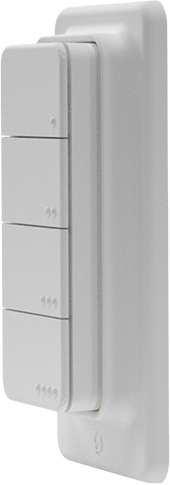
Device identification
- Device name: Shelly BLU RC Button 4 ZB
- Device model: SBBT-104CUS
- Device Bluetooth ID: 0x0016
Short description
Shelly BLU RC Button 4 ZB (the Device) is a smart four-button Bluetooth and Zigbee remote control interface. It features long battery life, multi-click control, and strong encryption. The Device has in-built magnets and a magnetic holder included in the package, providing users with versatile placement and usage options.
Main features
- Long battery life
- Supports multi-click
- Compact size, portability, and ease of use
- Strong encryption
- Variety of placement and usage options
Use cases
- Lighting control: Assign the button to control specific lighting scenes or individual smart lights. For example, a single press could turn on/off the lights, while a long-term press could dim or brighten them.
- Garage door opener: Use the strong encryption of Shelly BLU RC Button 4 ZB to control your smart garage door opener as you approach or leave your garage.
- Smart blinds or curtains: Open or close motorized blinds or curtains at the touch of a button.
- Location-based automation: Set the device in Beacon mode to trigger specific actions when you come within Bluetooth range. Use the Device for presence control, for example to keep lights on while you need to spend some time in a certain area.
- Scene control: Use the 4 buttons to activate any scene or specific actions you can imagine. Each button supports single, double, triple, and long push — which allows the user to make 16 different actions!
Connectivity
- Bluetooth
- Zigbee
User interface
Inputs
- Four push buttons
To enter Bluetooth pairing mode:
- Press any of the buttons 4 times. The LED starts flashing in blue and the Device enters Bluetooth pairing for one minute.
To enter Zigbee pairing mode:
- Press any of the buttons 5 times. The LED starts flashing in purple and the Device enters Zigbee commissioning mode for one minute.
Factory reset:
- Press and hold any button for 30 seconds to factory reset (possible only shortly after inserting the battery).
Outputs
- LED indication
- Blue light flashing when the Device is in Bluetooth pairing mode.
- Purple light flashing when the Device is in Zigbee pairing mode.
- Green light flashing when a button is pressed shortly. The number of flashes corresponds to the number of the button presses.
- Yellow light flashing on long press.
Specifications
| Quantity | Value |
|---|---|
| Physical | |
| Size (HxWxD): | - Button: 65 × 30 × 13 mm / 2.56 × 1.18 × 0.51 in - Magnetic holder (for wall switch boxes): 105 × 44 × 13 mm / 4.13 × 1.73 × 0.51 in* - Magnetic holder (for flat surfaces): 83 × 44 × 9 mm / 3.27 × 1.73 × 0.35 in |
| Weight | 21 g / 0.74 oz |
| Shell material | Plastic |
| Shell color | White |
| Environmental | |
| Ambient working temperature | -20 °C to 40 °C / -5 °F to 105 °F |
| Humidity | 30% to 70% RH |
| Electrical | |
| Power supply | 1 × 3 V battery (included) |
| Battery type | CR2032 |
| Estimated battery life | Up to 2 years |
| Bluetooth | |
| Protocol | 5 (LE) |
| RF band | 2402 – 2480 MHz |
| Max. RF power | < 8 dBm |
| Range | Up to 10 m / 33 ft indoors and 30 m / 100 ft outdoors (Depends on local conditions) |
| Zigbee | |
| Protocols | 802.15.4 |
| RF bands | 2405 to 2480 MHz |
| Max. RF power | < 8 dBm |
| Range | Up to 10 m / 33 ft indoors and 30 m / 100 ft outdoors (Depends on local conditions) |
| Microcontroller unit | |
| CPU | EFR32MG27 |
| Flash | 768 kB |
| Firmware capabilities | |
| Schedules | No |
| Webhooks (URL actions) | No |
| Scripting | No |
| MQTT | No |
| Encryption | Yes |
| Other | |
| Supported Devices | - Shelly Plus / Gen3 / Gen4 series - Shelly Pro series |
Available only for products distributed in the US market