
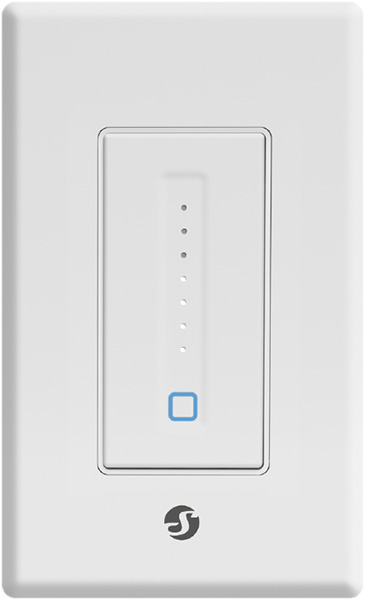
Device identification
- Device name: Shelly Plus Wall Dimmer
- Device model: SNDM-0013US
- Device SSID: ShellyPlusWDUS-XXXXXX
Short description
Shelly Plus Wall Dimmer (The Device) can switch on/off and vary the brightness of compatible dimmable lights. It can be easily wired in the place of a standard US light switch. Enhanced with all the gen2 firmware flexibility, it provides professional integrators with additional options for end customer solutions. It can work standalone in a local Wi-Fi network, or it can also be operated through cloud home automation services.
Shelly Plus Wall Dimmer can be accessed, set up and monitored remotely from any place where the User has internet connectivity, as long as the device is connected to a Wi-Fi router and the Internet.
The Device has an embedded Web Interface which can be used to monitor and control the device, as well as adjust its settings.
Features
- Night mode
- Weekly schedules
- Auto on/off timers
Main applications
- Residential
- MDU (Multi Dwelling Units - apartments, condominiums, hotels, etc.)
- Light commercial (small office buildings, small retail/restaurant/gas station, etc.)
- Government/municipal
- University/college
Integrations
- Amazon
- Samsung SmartThings
Simplified internal schematics
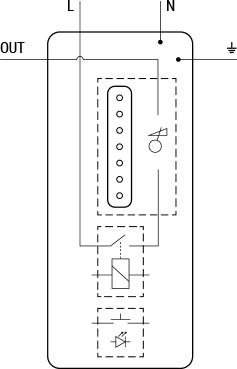
Device electrical interfaces
Inputs
- 2 line wires: 1 black L and 1 white N
- 1 green ⏚ (Ground) wire
Output
- 1 red OUT wire
Connectivity
- Wi-Fi
- Bluetooth
Supported load types
- Incandescent lights
- Dimmable only LED lights
- Dimmable only CFL
User interface
Inputs
One power button with LED indication:
- Press to turn on/off the lights.
- Press and hold for 5 sec to activate Device AP.
- Press and hold for 10 sec to factory reset the Device.
One slider with brightness LED indication:
- Slide up to increase the lights brightness.
- Slide down to decrease the light brightness.
Outputs
Power button LED indication:
- Blue Wi-Fi LED*:
- AP enabled and Wi-Fi disabled: Blue light flashing¹.
- Wi-Fi enabled but not connected: Blue light flashing slowly².
- Wi-Fi connected and Cloud disabled or connected: Steady blue light.
- Wi-Fi connected and Cloud enabled but not connected: Blue light flashing very slowly³.
- Power button pressed and held for 5 sec: Blue light flashing quickly⁴.
- Power button pressed and held for 10 sec: Blue light flashing very quickly⁵.
- OTA: Blue light flashing quickly⁴.
- White Power LED**:
- AP enabled and Wi-Fi disabled: White light flashing¹.
- Wi-Fi enabled but not connected: White light flashing slowly².
- Wi-Fi connected and Cloud disabled or connected: Steady white light.
- Wi-Fi connected and Cloud enabled but not connected: White light flashing very slowly³.
- Power button pressed and held for 5 sec: White light flashing quickly⁴.
- Power button pressed and held for 10 sec: White light flashing very quickly⁵.
- OTA: White light flashing quickly⁴.
- Blue Wi-Fi LED*:
Brightness LED indication:
- A single white dot is lit when the lights are turned off. Each position from bottom to top represents a 14% increase in brightness (84–100% for the top dot).
- A vertical bar of white dots is lit when the lights are turned on. Each lit dot represents a 14% increase in brightness (84–100% for the top dot).
* Blue Wi-Fi LED can be enabled (default) or disabled by the user.
** White Power LED can be set by the user to: match the Device output (default), invert the Device output, always ON, or always OFF.
¹ 1 second ON / 1 second OFF
² 1 second ON / 3 seconds OFF
³ 1 second ON / 5 seconds OFF
⁴ ⅕ second ON / ½ second OFF
⁵ ⅕ second ON / ⅕ second OFF
Specifications
| Type | Value |
|---|---|
| Physical | |
| Size without face plate and wires (HxWxD) | 104×44×39 ±0.5 mm / 4.09 × 1.73 × 1.50 ±0.02 in |
| Size with face plate and without wires (HxWxD) | 120×70×39 ±0.5 mm / 4.72 × 2.76 × 1.50 ±0.02 in |
| Weight without face plate | 105 g / 3.70 oz |
| Weight with face plate | 121 g / 4.28 oz |
| Shell material | ABS |
| Color | White |
| Environmental | |
| Ambient temperature | -20 °C to 40 °C / -5 °F to 105 °F |
| Humidity | 30 % to 70 % RH |
| Electrical | |
| Power supply voltage AC | 100 - 120 V, 50/60 Hz |
| Power supply voltage DC | N/A |
| Power consumption | < 3 W |
| Output circuits ratings | |
| Max load power at 120 VAC | 400 W (incandescent) 150 W (dimmable only LED and CFL) |
| Radio | |
| RF band | 2400 - 2495 MHz |
| Max. RF power | <20 dBm |
| Wi-Fi protocol | 802.11 b/g/n |
| Wi-Fi Range | Up to 30 m / 100 ft indoors and 50 m / 160 ft outdoors (Depends on local conditions) |
| Bluetooth Protocol | 4.2 |
| Bluetooth Range | Up to 10 m / 33 ft indoors and 30 m / 100 ft outdoors (Depends on local conditions) |
| MCU | |
| CPU | ESP32 |
| Flash | 4 MB |
| Firmware capabilities | |
| Webhooks (URL actions) | 20 with 5 URLs per hook |
| Scripting | Yes |
| MQTT | Yes |
| CoAP | No |
Wiring diagram
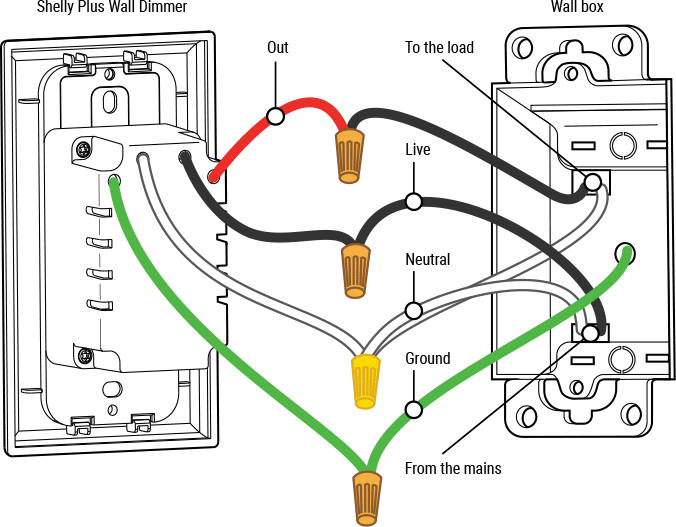
Troubleshooting
...
Components and APIs
Printed user guide
Shelly Plus Wall Dimmer multilingual printed user and safety guide
Installation guides
There are no items with the selected labels at this time.