
Shelly Pro Dimmer 2PM
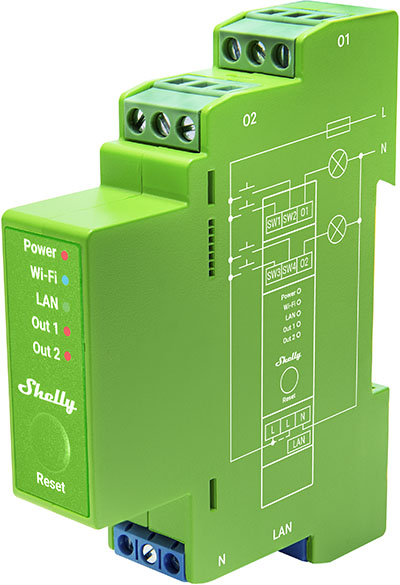
Device Identification
- Device name: Shelly Pro Dimmer 2PM
- Device model: SPDM-002PE01EU
- Device SSID: ShellyProDM2PM-XXXXXXXXXXXX
- Device Bluetooth ID: 0x200E
Short Description
Shelly Pro Dimmer 2PM (the Device) is a DIN-rail mountable, two-channel smart dimmer. It can work standalone in a local Wi-Fi network or be operated through cloud home automation services. The device can be accessed, controlled, and monitored remotely from any location with internet connectivity, as long as it's connected to a Wi-Fi router and the Internet. It features an embedded Web Interface for monitoring, controlling, and adjusting settings.
Main Features
- DIN rail mountable
- Automatic dimming calibration: Provides smooth dimming throughout the entire range.
- Switch/Button input mode: Allows flexible input control via switches or buttons.
- One/dual button dimming control: Enables full functionality with any wall switch configuration.
- Night mode: Set specific brightness levels during nighttime hours.
- Min/Max brightness: Reframes dimming signal range for more precise brightness control.
- Button fade rate: Controls how quickly output brightness changes while holding a button.
- Transition duration: Sets time for dimming from 0% to 100%.
- Safety: Overcurrent, overvoltage, and overpower protection.
- Weekly schedules: Supports daily routines including brightness, transition duration, and flip value adjustments.
- Auto on/off timers: Enables automated on/off timing.
- Local actions: Create automation scenarios within the local Wi-Fi network.
- Webhooks: Lightweight, event-driven communication with other devices.
- BLE Gateway: Facilitates communication between BLE and Wi-Fi-enabled devices.
- Wi-Fi Range Extender: Retransmits Wi-Fi signal to extend reach.
- Scripting: Create automation scenarios using scripts.
- Compatibility: Highly compatible with third-party home automation systems.
- No need for hub: Ready for use locally or remotely via Shelly Smart Control or third-party systems.
Use Cases
- Control brightness of dimmable lights (110–240 V range).
- Create smart schedules for automatic brightness adjustment throughout the day.
- Retrofit existing lighting systems while retaining current switches.
- Sync lights with sunrise and sunset times using smart schedules.
- Activate night mode for reduced brightness at night.
- Integrate with third-party platforms like Home Assistant, Google Home, Alexa, and SmartThings.
- Dim lights up/down with single or double button presses.
- Monitor and measure power usage for energy management.
- Achieve precise, customized lighting control in professional DIN rail installations.
Integrations
Amazon Alexa Supported Capabilities
Google Smart Home Supported Traits
Samsung SmartThings Supported Capabilities
Simplified Internal Schematics
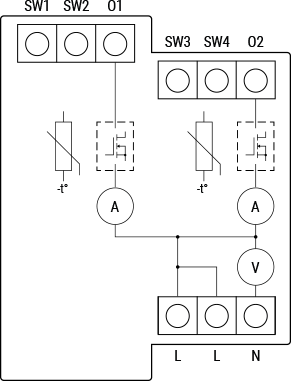
Device Electrical Interfaces
Inputs
- 4 switch/button inputs on screw terminals: SW1, SW2, SW3, SW4
- 3 power supply inputs on screw terminals: 2 L and 1 N
Outputs
- 2 outputs: O1 and O2
Ethernet Port
- 1 RJ45 connector
⚠ CAUTION! Plug in or unplug the LAN cable only when the device is powered off. Avoid touching metallic parts of the connector when inserting/removing the cable.
Add-on Interface
- Shelly proprietary serial interface
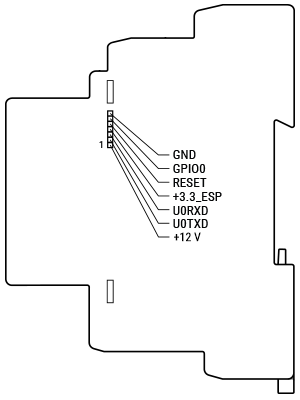
⚠ CAUTION! High voltage present on the add-on interface when the device is powered!
Connectivity
- Ethernet
- Wi-Fi
- Bluetooth
Safety Function
- Overheating protection
- Overvoltage protection
- Overcurrent protection
- Overpower protection
Supported Load Types
- Dimmable LED lamps: up to 200 W per channel
- Incandescent bulbs: up to 200 W per channel
- Halogen lamps: up to 200 W per channel
- Iron-core transformer with low-voltage incandescent lamps: up to 200 VA per channel
- Dimmable electronic transformers: up to 200 W per channel
User Interface
Inputs
- One (Reset) button:
- Press and hold for 5 seconds to enable Device Access Point and Bluetooth connection.
- Press and hold for 10 seconds to factory reset the device.
Outputs
- LED indication:
- Power (red): On if power supply is connected.
- Wi-Fi (varies):
- Blue: AP mode
- Red: STA mode, not connected to Wi-Fi
- Yellow: STA mode, connected to Wi-Fi but not to Shelly Cloud (or Cloud disabled)
- Green: STA mode, connected to Wi-Fi and Shelly Cloud
- Flashing Red/Blue: OTA update in progress
- LAN (green): On if LAN is connected.
- Out 1 (red): On if Output 1 is active.
- Out 2 (red): On if Output 2 is active.
Specifications
| Quantity | Value |
|---|---|
| Physical | |
| Size (H×W×D) | 94 × 19 × 69 mm / 3.70 × 0.75 × 2.71 in |
| Weight | 75 g / 2.7 oz |
| Screw terminals max torque | 0.4 Nm / 3.54 lbin |
| Conductor cross section | 0.5 to 2.5 mm² / 20 to 14 AWG (green connectors) 0.5 to 1.5 mm² / 20 to 16 AWG (blue connector) (solid, stranded, and bootlace ferrules) |
| Conductor stripped length | 6–7 mm / 0.24–0.28 in (green connectors) 5–6 mm / 0.20–0.24 in (blue connector) |
| Mounting | DIN rail |
| Shell material | Plastic |
| Shell color | Lime |
| Environmental | |
| Ambient working temperature | -20 °C to 40 °C / -5 °F to 105 °F |
| Humidity | 30% to 70% RH |
| Max. altitude | 2000 m / 6562 ft |
| Electrical | |
| Power supply | 110–240 V~ 50/60 Hz |
| Power consumption | < 2 W |
| External protection | 10 A, tripping characteristic B or C, 6 kA interrupting rating, Energy limiting class 3 |
| Dimming type | Trailing edge |
| Output circuits ratings | |
| Max. output power | 200 W per channel |
| Sensors, meters | |
| Voltmeter (AC) | Yes |
| Ammeter (AC) | Yes |
| Power and energy meters | Yes |
| Internal-temperature sensor | Yes |
| Radio | |
| Wi-Fi | |
| Protocol | 802.11 b/g/n |
| RF band | 2401 – 2483 MHz |
| Max. RF power | < 20 dBm |
| Range | Up to 30 m / 100 ft indoors Up to 50 m / 160 ft outdoors (depends on local conditions) |
| Bluetooth | |
| Protocol | 4.2 |
| RF band | 2400 – 2483.5 MHz |
| Max. RF power | < 4 dBm |
| Range | Up to 10 m / 33 ft indoors Up to 30 m / 100 ft outdoors (depends on local conditions) |
| Microcontroller unit | |
| CPU | ESP32-D0WDQ6 |
| Flash | 8 MB |
| Firmware capabilities | |
| Schedules | 20 |
| Webhooks (URL actions) | 20 with 5 URLs per hook |
| Scripting | Yes |
| MQTT | Yes |
Basic Wiring Diagrams
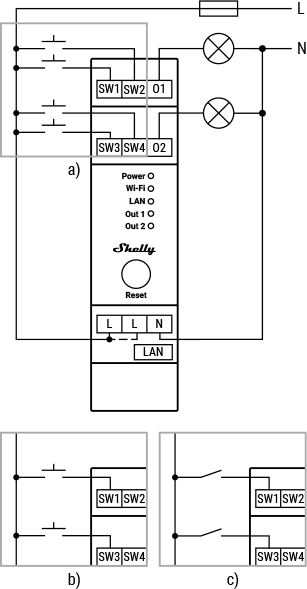
Legend
| Terminals | Description |
|---|---|
| SW1, SW2 | Switch/button input terminals controlling O1 |
| SW3, SW4 | Switch/button input terminals controlling O2 |
| O1, O2 | Load circuit output terminals |
| L | Live (110–240 V) wire |
| N | Neutral wire |
| LAN | Local Area Network RJ45 connector |
Troubleshooting
- Verify working voltage and grid supply: Using an incompatible power source may cause malfunction.
- Ensure proper power supply: Check cables, outlets, and power indicators.
- Inspect power quality: Voltage spikes/fluctuations can affect performance; consider surge protectors or voltage regulators.
- Check connections: Ensure all wiring is secure and properly seated.
- Inspect physical components: Look for signs of damage or overheating.
- Monitor environmental factors: Consider temperature and humidity levels.
- Check load compatibility: Confirm your load matches supported types.
- Verify network connection: Ensure correct network settings; restart routers/switches if needed.
- Confirm system compatibility: Ensure hardware/software are compatible.
- Review device settings: Verify configurations match intended use.
- Restart/reboot: Turn off, wait a few seconds, then power back on.
- Update firmware/software: Check for updates to fix known issues and improve performance.
These are general troubleshooting steps. For persistent issues, contact Shelly Technical Support.
Shelly Smart Control
Components and APIs
Compliance
- Shelly Pro Dimmer 2PM multilingual EU Declaration of Conformity (2025-07-22)
- Shelly Pro Dimmer 2PM UK PSTI ACT Statement of Compliance
- Shelly Pro Dimmer 1PM & 2PM AU/NZ Certificate for Suitability
 Compliance archive
Shelly Pro Dimmer 2PM multilingual EU declaration of conformity (2024-02-21)
Printed User Guide
Additional Language Version
Installation Guides
There are no items with the selected labels at this time.