
Shelly 1 Gen4 ANZ
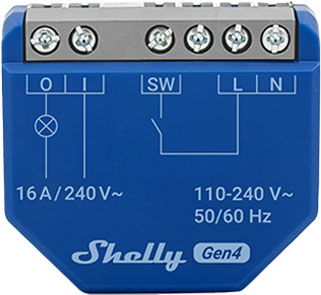
Device identification
- Device name: Shelly 1 Gen4
- Device model: S4SW-001X16EU
- Device SSID: Shelly1G4-XXXXXXXXXXXX
- Device Bluetooth ID: 0x1028
Short description
Shelly 1 Gen4 ANZ is a small form factor smart switch with potential-free contacts, which allows remote control of electric appliances through a mobile phone, tablet, PC, or home automation system. It can work standalone in a local Wi-Fi network or it can also be operated through cloud home automation services.
Shelly 1 Gen4 ANZ can be accessed, controlled and monitored remotely from any place where the user has internet connectivity, as long as the device is connected to a Wi-Fi router and the Internet.
It can be retrofitted into standard electrical wall boxes, behind power sockets and light switches or other places with limited space.
Shelly 1 Gen4 ANZ has an embedded Web Interface, which can be used to monitor and control the device, as well as adjust its settings.
The device has multi-protocol wireless MCU which provides Zigbee and Bluetooth connectivity, ensuring a secure connection.
This device is compatible with Matter.
Main features
- Wi-Fi Connectivity: The device can connect to your home Wi-Fi network, allowing you to remotely monitor humidity and temperature data through a smartphone app or other compatible devices.
- Integration with Smart Home Platforms: You can integrate the Shelly 1 Gen4 ANZ with popular smart home platforms, including Google, Alexa, and Samsung SmartThings. This enables voice control and automation capabilities through these platforms.
- Local and Cloud Control: Can function independently in a local Wi-Fi network and can also be operated through cloud home automation services.
- Bluetooth Connectivity: Bluetooth and BLE gateways are available for inclusion purposes, which may be useful during the setup process.
- Zigbee Connectivity: Zigbee is available for inclusion purposes, which may be useful during the setup process.
- User-Friendly Interface: The device provides a user-friendly interface with a reset button for manual interactions.
- Improved Processor: Upgraded with an improved processor and support for Zigbee connectivity.
- Embedded Web Interface: Features an embedded web interface for monitoring, control, and adjustment of settings.
- Wireless Connectivity: The device supports Wi-Fi (802.11 b/g/n/ax) and Bluetooth 5.0 protocols with specified indoor and outdoor range capabilities.
- Dry Contact: The relay’s output do not carry any voltage or current from the relay itself—it’s electrically isolated. This means it’s volt-free or potential-free.
- BLE Gateway: Bridge between your Shelly BLU devices and the wider Shelly ecosystem. It receives Bluetooth signals and sends them to the cloud or locally to another non-Bluetooth device.
- Wi-Fi Range extender for IoT devices: A Wi-Fi extender is employed to expand the reach of your Wi-Fi network by receiving your current Wi-Fi signal, enhancing its strength, and then transmitting the enhanced signal over a wider area.
- Zigbee Range extender for IoT devices: A Zigbee extender is employed to expand the reach of your Zigbee network by receiving your Zigbee signal, enhancing its strength, and then transmitting the enhanced signal over a wider area.
- Scripting: Shelly Script Language Features
- Wide range of integrations: The device can be integrated with 3rd party home systems, documented HTTP API, MQTT(s), Web Hooks over HTTP and HTTPS, UDP
- Schedules: Allows scheduling of complex operations to be executed in predefined time window. Users can specify time windows based on date, time of day, weekdays, hours, minutes and seconds.
- Virtual Components: Virtual Dynamic Components
- KNX net/IP support: KNX Integration Guide
Use cases
- Remote Appliance Control: Turn on or off electric appliances remotely using your mobile phone, tablet, PC, or home automation system.
- Internet-Connected Convenience: Access and control devices from anywhere with internet connectivity, as long as the Shelly 1 Gen4 ANZ is connected to a Wi-Fi router.
- Home Automation: Shelly 1 Gen4 ANZ enables automatic control of power appliances for more relaxing and enjoyable experience.
Home Automation Use Cases
Light Control
- Remote control of standard lights (LED, incandescent, halogen).
- Set timers or schedules for lights (e.g., porch lights on at sunset).
- Use with motion sensors (for example Shelly BLU Motion) for occupancy-based lighting.
Garage Door Automation
- Act as a smart trigger to open/close garage doors.
- Monitor door status with a sensor input (e.g., using Shelly Plus Add-on).
- Integrate with voice assistants for hands-free control.
Fan or Ventilation Control
- Automate bathroom or kitchen fans based on humidity sensors (like Shelly BLU H&T).
- Turn on ventilation during specific times of day or based on occupancy.
Heater or Towel Rail Switching
- Control electric towel warmers or heaters (Max. switching current: 16A).
- Schedule operation or link to temperature thresholds via sensors (like Shelly BLU H&T).
Commercial Applications
Lighting Automation in Small Offices or Shops
- Control light zones based on business hours.
- Use with motion detectors (e.g., Shelly BLU Motion) for energy savings.
Meeting Room Occupancy
- Enable or disable equipment like projectors depending on occupancy.
Security and Access Systems
- Remotely unlock gates or doors for deliveries.
- Monitor open/close state of access points.
Industrial/Utility Use Cases
Equipment Monitoring & Control
- Power cycling routers, modems, or network switches.
Pump or Motor Control
- Automate irrigation pumps in greenhouses or fields (Max. switching current: 16A).
- Remotely control valves (e.g., Shelly Add-On Mechanical Manipulator).
Main applications
- Residential
- MDU (Multi Dwelling Units – apartments, condominiums, hotels, etc.)
- Light commercial (small office buildings, small retail/restaurant/gas station, etc.)
- Government/municipal
- University/college
Simplified internal schematics
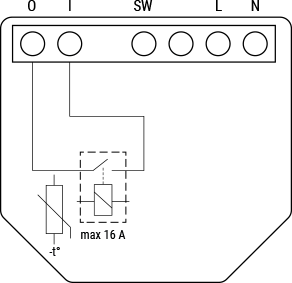
Device electrical interfaces
Inputs
- 1 switch/button input on screw terminal: SW
- 1 potential-free contacts relay input on screw terminal: I
- 2 power supply inputs on screw terminals: N and L
Outputs
- 1 potential-free contacts relay output on screw terminal: O
Add-on interface
- Shelly proprietary serial interface
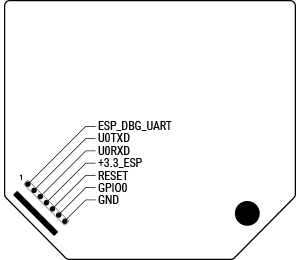
⚠ CAUTION! High voltage on the add-on interface when the device is powered!
Connectivity
- Wi-Fi
- Bluetooth
- Zigbee
- Matter
Safety function
- Overheating protection
Supported load types
- Resistive (incandescent bulbs, heating appliances)
- Capacitive (capacitor banks, electronic equipment, motor starting capacitors)
- Inductive with RC Snubber (LED light drivers, transformers, fans, refrigerators, air-conditioners, washing machines, tumble dryers)
User interface
Inputs
- One (Control) button
- Press and hold for 5 seconds to enable Device access point and Bluetooth connection.
- Press and hold for 10 seconds to factory reset the device.
- Press the button 5 times to switch the device from Matter (default) to Zigbee profile. The device enters inclusion mode for 3 minutes. Include the device following the instructions of your Zigbee home automation system.
- Press the button 3 times to restart the inclusion mode for another 3 minutes if you missed the previous 3-minute window.
Outputs
- LED (monocolor) indication
- AP (Access Point) enabled and Wi-Fi disabled: 1 second ON / 1 second OFF
- Wi-Fi enabled, but not connected to a Wi-Fi network: 1 second ON / 3 seconds OFF
- Connected to a Wi-Fi network: Constantly ON
- Cloud is enabled, but not connected: 1 second ON / 5 seconds OFF
- Connected to Shelly Cloud: Constantly ON
- OTA (Over the Air Update): ½ sec ON / ½ sec OFF
- Button pressed and held for 5 seconds: ½ sec ON / ½ sec OFF
- Button pressed and held for 10 seconds: ¼ sec ON / ¼ sec OFF
The list above starts with the initial device status and the lowest priority. Every next state cancels the previous one.
Specifications
| Quantity | Value |
|---|---|
| Physical | |
| Size (HxWxD) | 37×42×16 mm / 1.46×1.65×0.63 inch |
| Weight | 26 g / 0.92 oz |
| Screw terminals max torque | 0.4 Nm / 3.5 lbin |
| Conductor cross section | 0.5 to 4 mm² / 20 to 11 AWG (solid, stranded, and bootlace ferrules) |
| Conductor stripped length | 6 to 7 mm / 0.24 to 0.28 in |
| Mounting | Wall console |
| Shell material | Plastic |
| Shell color | Blue |
| Terminals color | Grey (Mouse Grey) |
| Environmental | |
| Ambient working temperature | -20 °C to 40 °C / -5 °F to 105 °F |
| Humidity | 30 % to 70 % RH |
| Max. altitude | 2000 m / 6562 ft |
| Electrical | |
| Power supply | 110–240 V~ |
| Power consumption | < 1 W |
| Neutral not needed | No |
| External protection | Cable protection switch in accordance with EN60898-1 (tripping characteristic B or C, max. 16 A rated current, min. 6 kA interrupting rating, energy limiting class 3) |
| Output circuits ratings | |
| Max. switching voltage | 240 V~ |
| Max. switching current | 16 A / 240 V~ |
| Sensors, meters | |
| Internal-temperature sensor | Yes |
| Radio | |
| Wi-Fi | |
| Protocol | 802.11 b/g/n/ax |
| RF band | 2412 – 2472 MHz |
| Max. RF power | < 20 dBm |
| Range | Up to 30 m / 100 ft indoors and 50 m / 160 ft outdoors (Depends on local conditions) |
| Bluetooth | |
| Protocol | 5.0 |
| RF band | 2402 – 2480 MHz |
| Max. RF power | < 4 dBm |
| Range | Up to 10 m / 33 ft indoors and 30 m / 100 ft outdoors (Depends on local conditions) |
| Zigbee | |
| Protocol | 802.15.4 |
| Zigbee repeater | Yes |
| RF bands | 2400 to 2483.5 MHz |
| Max. RF power | < 20 dBm |
| Range | Up to 100 m / 328 ft indoors and 300 m / 984 ft outdoors (Depends on local conditions) |
| Microcontroller unit | |
| CPU | ESP-Shelly-C68F |
| Flash | 8 MB |
| Firmware capabilities | |
| Schedules | 20 |
| Webhooks (URL actions) | 20 with 5 URLs per hook |
| Scripting | Yes |
| MQTT | Yes |
Basic wiring diagrams
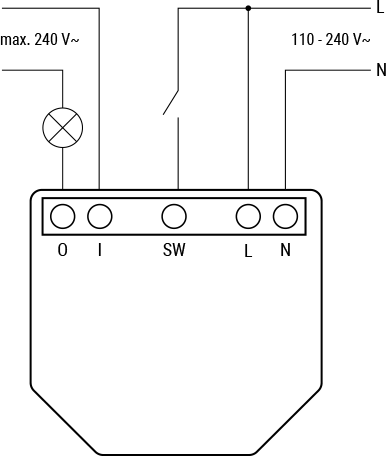
Legend
| Terminals | Description | Wires | Description |
|---|---|---|---|
| I | Load circuit input terminal | L | Live wire (110–240 V~) |
| O | Load circuit output terminal | N | Neutral wire |
| SW | Switch (controlling O) input terminal | ||
| L | Live terminal (110–240 V~) | ||
| N | Neutral terminal |
Components and APIs
Compliance
- Shelly 1 Gen4 multilingual EU declaration of conformity (2025-07-25)
- Shelly 1 Gen4 ANZ Certificate for Suitability
Printed user guide
Shelly 1 Gen4 ANZ printed user and safety guide