
Shelly AZ H&T
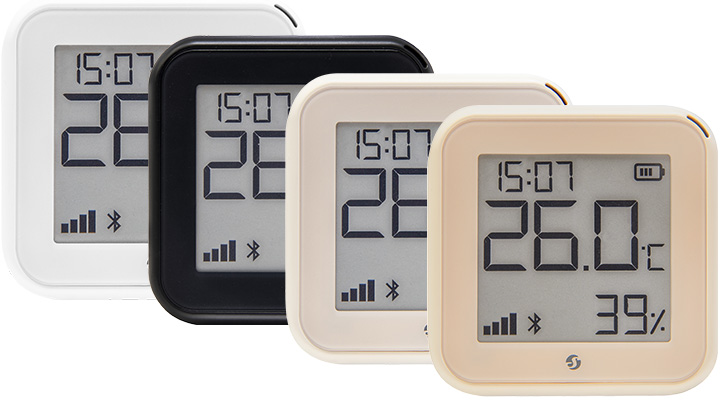
Device Identification
- Device name: Shelly AZ H&T
- Device model: S3SN-1U12A
- Device SSID: ShellyAZHT-XXXXXXXXXXXX
- Device Bluetooth ID: 0x1816
Short Description
The Shelly AZ H&T is a Wi-Fi smart humidity and temperature sensor featuring a large e-paper graphic display. It supports Frustration-Free Setup (FFS) by Amazon, enabling a quick and easy installation process.
Main Features
- Wi-Fi Connectivity: Connects to your home Wi-Fi network for remote monitoring via smartphone app or compatible devices.
- Large E-Paper Graphic Display: Clear, easy-to-read humidity and temperature information.
- Digital Clock: NTP-synchronized real-time clock.
- Integration with Smart Home Platforms: Compatible with Google, Alexa, and Samsung SmartThings for voice control and automation.
- USB Type-C Port: Used for continuous power; cannot charge internal batteries.
- Bluetooth Connectivity: Available for setup purposes.
- User-Friendly Interface: Includes a reset button for manual interaction.
- Battery Operation: Wakes at set intervals to measure humidity and temperature. Reports changes based on thresholds and unconditionally reports status if no updates occur within a specified time.
- USB-Powered Operation: Wakes more frequently, performs measurements, updates display, and unconditionally reports data.
- Environmental Specifications: Operates between 0°C to 40°C (32°F to 105°F); recommended humidity range: 30% to 70% RH.
- Power Supply Options: Powered by 4 AA batteries (not included) or USB Type-C.
- Wireless Connectivity: Supports Wi-Fi (802.11 b/g/n) and Bluetooth 4.2 with indoor/outdoor range capabilities.
- MCU (Microcontroller Unit): ESP-Shelly-C38F with 8 MB flash memory.
These features make the Shelly AZ H&T ideal for residential, multi-dwelling units, light commercial, university/college, and other environments, offering smart home integration and ease of use.
Main Applications
- Residential
- MDU (Multi Dwelling Units – apartments, condominiums, hotels, etc.)
- Light Commercial (small offices, retail, restaurants, gas stations)
- University/College
Use Cases
- Monitor and maintain optimal temperature and humidity levels in your home.
- Create automation scenes in the Shelly Control app (e.g., turn on a fan when temperature rises).
- Use as a virtual thermostat in a cloud app to remotely control heating/cooling systems.
- Save energy by automatically closing window covers when it gets too hot.
- Set up alerts for out-of-range humidity or temperature readings.
- Log temperature and humidity data over time for analysis.
- Integrate with voice assistants like Alexa or Google Home.
- Use the e-ink display to check real-time readings at a glance.
- Power the device via AA batteries or USB Type-C for flexibility.
- Mount on a wall or place on a desk for convenient placement.
Integrations
- Amazon Alexa: Yes
- Google Smart Home: Yes
- Samsung SmartThings: Yes
USB Type-C Port
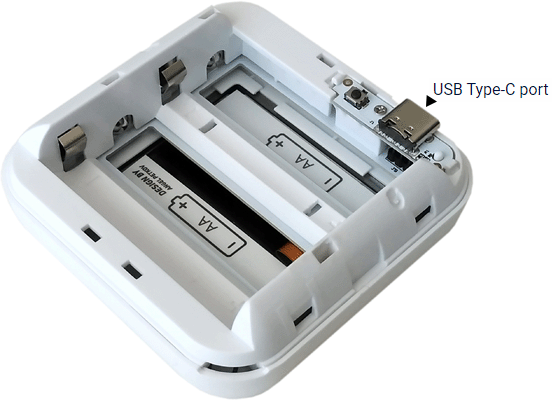
- Supplies power to the device.
- Cannot be used to charge internal batteries.
Connectivity
- Wi-Fi
- Bluetooth
User Interface
Inputs
- Reset button (located behind the back cover)
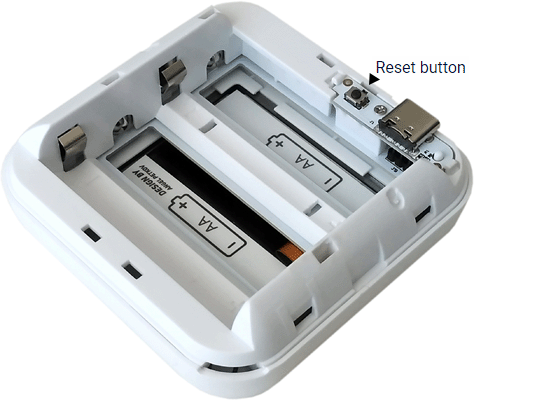
Reset Button Actions
- Press briefly:
- If in Sleep mode → enters Setup mode.
- If in Setup mode → returns to Sleep mode.
- Press and hold for 5 seconds:
- If in Setup mode → enables access point.
- Press and hold for 10 seconds:
- If in Setup mode → factory resets the device.
Outputs
- E-paper graphic display
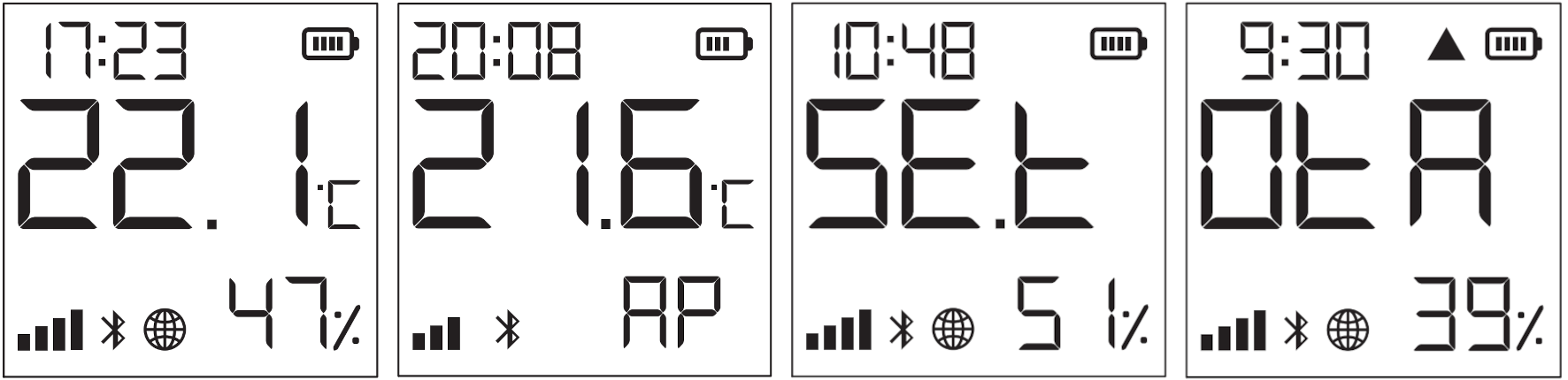
| Icon | Meaning |
|---|---|
 | Current time |
 | Device is in Setup mode |
 | Access point enabled |
 | Humidity readings |
 | Receiving over-the-air update (shows progress as %) |
 | Data reported to Cloud (if missing, display may differ from cloud) |
 | Wi-Fi signal strength indicator |
 | Battery level (shows empty when USB-powered) |
 | Bluetooth connectivity enabled |
 | Firmware update error |
Measuring and Reporting
On Batteries
- Wakes every minute to take a measurement. Screen updates if there's a change ≥ 0.2°C or 3% humidity.
Default reporting threshold: ≥ 0.5°C or 5% change. - If no report is sent for two hours, device unconditionally reports status to Shelly Cloud and connected channels.
- Self-heating requires a 5-minute cooldown period during which the device remains asleep.
On USB Power Supply
- Wakes every 5 minutes
- Performs measurement
- Updates screen
- Unconditionally reports to all connected channels
- Sleeps for 5 minutes
User-Initiated Report
- Pressing the reset button wakes the device, takes a measurement, updates the screen, reports data unconditionally, then sleeps for 5 minutes.
Specifications
| Category | Details |
|---|---|
| Physical | |
| Size (H×W×D): | 70×70×26 mm / 2.76×2.76×1.02 in (without stand) 70×70×45 mm / 2.76×2.76×1.77 in (with stand) |
| Weight | 47 g / 1.66 oz |
| Mounting | With stand (on flat surface) Wall mounting (using screws: 5–7 mm head diameter, ≤3 mm thread diameter) or double-sided foam sticker |
| Shell Material | Plastic |
| Shell Color | White, Mocha, Ivory, Black |
| Environmental | |
| Ambient Working Temperature | 0 °C to 40 °C / 32 °F to 105 °F |
| Humidity | 30% to 70% RH |
| Max Altitude | 2000 m / 6562 ft |
| Electrical | |
| Power Supply | Batteries |
| Battery Type | 4 × AA (LR6), 1.5 V (not included) |
| Estimated Battery Life | ~1 year (varies by battery type, environmental conditions, and network strength) |
| USB Power Supply | Type-C (adapter and cable not included) |
| Sensors & Meters | |
| Internal Temperature Sensor | No |
| Temperature Sensor | Yes |
| Humidity Sensor | Yes |
| Radio | |
| Wi-Fi | |
| Protocol | 802.11 b/g/n |
| RF Band | 2401 – 2495 MHz |
| Max RF Power | < 20 dBm |
| Range | Up to 30 m / 100 ft indoors Up to 50 m / 160 ft outdoors (Depends on local conditions) |
| Bluetooth | |
| Protocol | 4.2 |
| RF Band | 2400 – 2483.5 MHz |
| Max RF Power | < 4 dBm |
| Range | Up to 10 m / 33 ft indoors Up to 30 m / 100 ft outdoors (Depends on local conditions) |
| Microcontroller Unit (MCU) | |
| CPU | ESP-Shelly-C38F |
| Flash Memory | 8 MB |
| Firmware Capabilities | |
| Schedules | No |
| Webhooks (URL actions) | 10 hooks, each with 2 URLs |
| Scripting | No |
| MQTT | Yes |
Troubleshooting
| Problem | Possible Cause | Solution |
|---|---|---|
| Device not powering on | Drained or incorrectly inserted batteries | Replace or correctly insert batteries |
| Faulty USB cable or power source | Check cable and power source | |
| Inclusion process stalls | Device entered sleep mode | Press the reset button to wake it |
| Inaccurate measurements or slow response | Outdated firmware | Update firmware |
| Digital clock not visible | Not connected to Wi-Fi | Connect via web interface |
| Device out of Wi-Fi range | Move closer to router | |
| Measurements not updating | Reporting thresholds not met | Adjust thresholds in Shelly Smart Control app |
| Device in sleep mode | Assign static IP address to reduce sleep intervals and extend battery life | |
| Data not syncing to cloud | Device offline or out of Wi-Fi range | Ensure Wi-Fi connection; check in web interface or cloud and reconnect if needed |
If you can't resolve your issue, join our Shelly Support Group on Facebook or contact us at support@shelly.cloud.
Components and APIs
Compliance and Certification
Shelly AZ H&T Multilingual EU Declaration of Conformity (2025-07-23)
Printed User Guide
Shelly AZ H&T Multilingual Printed User and Safety Guide
Installation Guides
There are no items with the selected labels at this time.